To check the Last Epoch server status, start with the newest timestamped announcement from Last Epoch’s official forum, official social account, or Discord news channel. Confirm that the post refers to today, names online services or maintenance, and includes an update or expected return time. A static guide or an old outage thread cannot tell you whether the servers are currently up.
Check official server announcements first. For a connection issue without current downtime, follow official connection troubleshooting or submit a support request.
If there is no current official notice, do not immediately assume the entire game is down. Test whether the failure affects one region, one party, one activity, or only your connection. Last Epoch supports online play and full offline play, but online and offline characters are separate and cannot be transferred between those modes.
Check Official Last Epoch Status Updates First
Official maintenance and outage messages provide the strongest evidence because they can identify the affected service, the start of downtime, and the expected recovery time. Check these locations in order:
- Look at the newest posts from the official Last Epoch account. Maintenance messages may be posted there with a UTC return time.
- Check the News and Patch Notes areas of the official forum. A maintenance thread may contain later updates even if the original estimate changes.
- Check the official Discord news channel when the forum does not yet have a matching post. Last Epoch has previously used Discord for time-sensitive service notices.
- Read the timestamp before acting. A maintenance message from a previous patch or season launch is historical, even if its wording says that servers are offline.
- Check for a follow-up saying service was restored. The first outage message may remain visible after the incident has ended.
The latest verified game version for this page is 1.5.2. If an official post says a new client build is being deployed, allow Steam to install it before treating a failed login as proof of an outage. A player still running an older build can see a connection problem while updated players are already entering the game.
An official message should also be interpreted narrowly. A post about patch deployment does not automatically mean every region is unavailable for the entire deployment. Conversely, the absence of a new public post does not prove that every server is healthy. It means you should continue with regional and local checks instead of guessing.
Interpret Community Outage Trackers Carefully
Community status trackers can provide a useful second signal, especially when many players report the same problem within a short period. They are not authoritative server telemetry. Their labels are calculated from submitted reports, browser sessions, thresholds, or other indirect data.
A green or operational label therefore means that the tracker has not detected enough reports to classify an outage. It does not guarantee that your region, character service, login service, or current game instance is working. A low-volume regional issue may never cross the tracker’s outage threshold.
Use a tracker more confidently when all of these conditions are present:
- Reports rose recently rather than several days ago.
- Multiple players describe the same stage of failure, such as login, character loading, or zone transitions.
- Reports come from more than one household or internet provider.
- The affected platform and region match yours.
- An official channel later acknowledges the same incident.
Treat comments such as “servers down” as reports, not confirmation. Old Reddit and Steam discussions often remain prominent in search results long after their incidents ended. Always compare their publication date with today before using them to make a decision.
Identify the Type of Connection Failure
The point where the game fails helps determine your next step. Preserve any displayed error code and note exactly what happened before it appeared.
| What you see | What it establishes | Best next check |
|---|---|---|
| An official maintenance notice with a current timestamp | Online downtime is planned or acknowledged | Follow the same thread for the revised return time or recovery update |
| Online play unavailable before character selection | The online login path may be affected | Compare official notices, another region, and recent matching reports |
| The game remains on Connecting after character selection | Authentication or server entry did not complete | Check whether other players are failing at the same stage and restart after confirming the client is updated |
| A character loads but a zone transition stalls | The problem is narrower than initial login | Test another destination and review reports for the same activity or region |
| High latency in one preferred region | The service may be reachable but poorly routed for you | Select another reasonable region and test the next server instance |
| One dungeon, quest, skill, or interface feature fails while normal online play continues | This does not demonstrate a full server outage | Check current patch notes and report the reproducible bug |
| Friends can play in your region while you cannot | A universal outage is less likely | Check your client update, connection path, and selected region |
An error such as LE-61 is useful diagnostic information, but the code by itself does not establish that every Last Epoch server is down. Record the code, affected character, selected region, and activity. That information is more useful than repeatedly pressing the login button without changing or observing anything.
Test Whether the Problem Is Global, Regional, or Local
Last Epoch lets you change your preferred server region at the login screen or in the Gameplay section of Settings. A region change does not move the server instance you are already using. It applies when the game requests a new server.
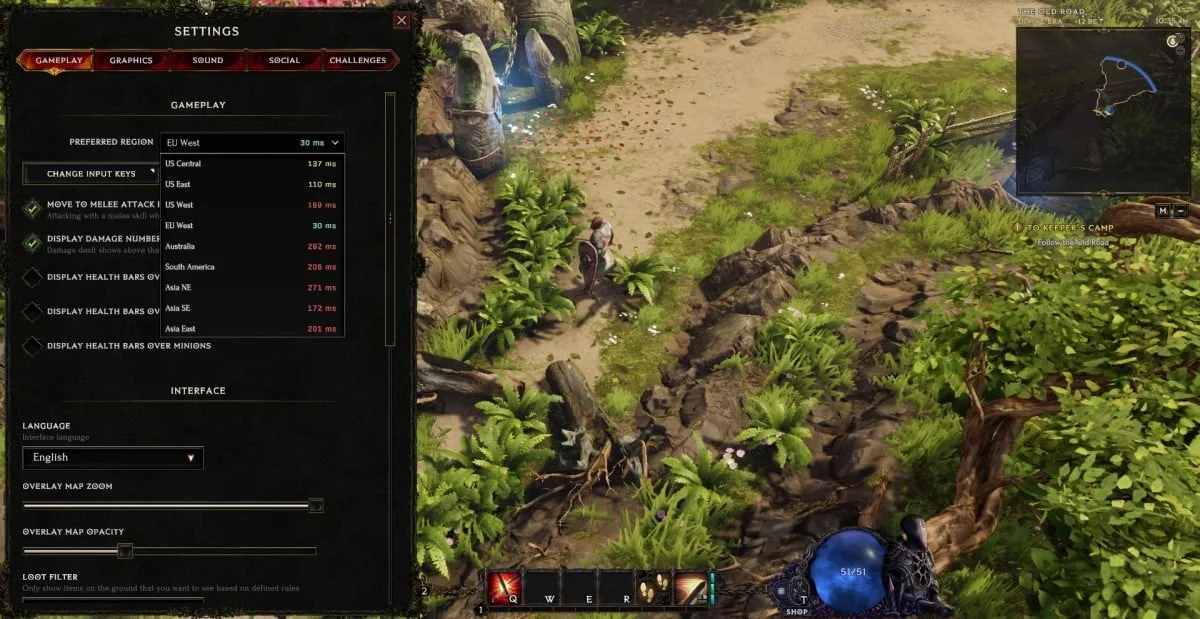
The Gameplay settings show the preferred region selector and current latency for each region.
Use this controlled test:
- Record your current preferred region and the stage where the failure occurs.
- Choose one other reasonable region. Expect latency to increase if it is farther from you.
- Request a new server by entering a suitable new area or reconnecting. Do not judge the change while remaining in the same instance.
- Repeat the exact action that failed, such as entering a zone or loading a character.
- If the alternate region works consistently, return later to your preferred region and retest. The result suggests a regional or routing problem, not proof of a worldwide outage.
- If both regions fail at the same stage and recent player reports match, recheck official channels for a newly acknowledged incident.
Monolith and Arena gameplay take place on a single server. Changing the preferred region during that activity does not immediately replace the current server. Move to another type of zone before expecting the new preference to apply.
For parties, the leader controls the region used for the party’s servers. The leader can change it through the Party tab in the Social menu; the default Social-menu hotkey is H. Pick a region that offers a workable compromise for the group instead of assuming every member should use the region closest to the leader.
If solo play works but a party fails, test with a newly formed party and confirm who is leading it. If one destination fails while other zones load, preserve that narrower result. It is more actionable than describing the entire game as offline.
Follow a Short Local Connection Check
When there is no current official outage notice, use a short sequence and change only one variable at a time:
- Exit Last Epoch completely and confirm that Steam has finished any available client update.
- Relaunch the game and note whether failure occurs before login, at character selection, or during a zone transition.
- Confirm that you selected the intended online character. Offline characters belong to a separate mode and do not test online service health.
- Test one alternate region using the method above.
- If possible, compare with a friend in the same region. Ask which stage they can reach rather than only asking whether the game works.
- Check whether unrelated internet services work normally. A broader connection failure points away from a Last Epoch-only incident.
- Preserve the exact error message and avoid deleting characters or local files as an outage experiment.
Repeated login attempts are not a useful diagnostic by themselves. A successful attempt after many failures may mean the incident recovered, a new server instance worked, or your route changed. Check the official follow-up before concluding that a particular retry fixed the problem.
Use Full Offline Mode During Online Downtime
Last Epoch includes full offline play. On Steam, open the game’s launch choices and select Play Full Offline rather than the standard online launch option.
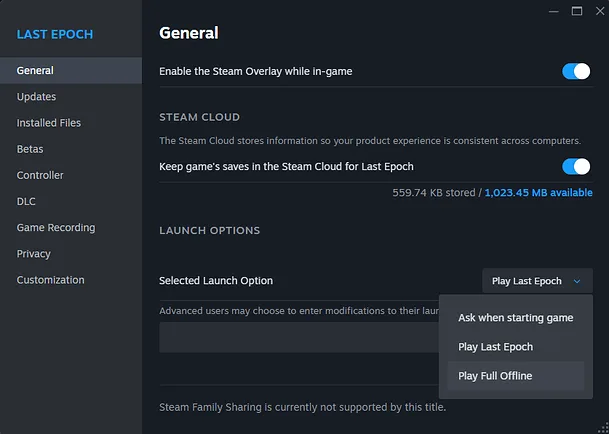
Select Play Full Offline from Steam when online services are unavailable.
Full offline mode is a fallback for playing without the online servers, not a way to continue an online character during maintenance. Keep these boundaries in mind:
- Online and offline characters cannot be transferred between modes.
- Progress made on an offline character does not become progress for your online seasonal character.
- An online character cannot be copied into offline mode simply because maintenance begins.
- Online party play and other online services are unavailable when you choose full offline mode.
- If you want an offline fallback, create and maintain that character separately before the next outage.
This distinction prevents a common mistake: selecting offline mode, seeing no online characters, and assuming that the save was deleted. First confirm which mode you launched. The missing character list may simply belong to the other mode.
Offline play is also not proof that the online servers are down. It only shows that the offline client path opened. Use the timestamped official channels and controlled online tests to determine the online service state.
Separate Server Problems from Game Bugs
A functioning login does not mean every activity or feature is bug-free. Version 1.5.2 includes fixes across skills, items, campaign areas, Monoliths, dungeons, random encounters, factions, enemies, and the interface. A problem limited to one of those areas should not be reported as a total outage unless online service also fails more broadly.
Classify the issue as a likely gameplay bug when you can log in, move between normal areas, and reproduce the failure only with a specific skill, item, quest, boss, or interface action. Record a short reproduction sequence, then use the in-game bug report tool by pressing F8. A support ticket is the better route when you need account-specific assistance.
Classify it as a possible service incident when multiple unrelated online actions fail, other players report the same stage of failure at the same time, and official channels acknowledge maintenance or an outage. Some incidents can affect character data or zone services without looking like a simple all-or-nothing shutdown, so follow any official safety instruction before continuing to play.
Last Epoch Server Status Decision Checklist
Use this condensed sequence whenever you cannot connect:
- Read the newest official post and verify its date, time, and affected service.
- Look for a later recovery update in the same channel or thread.
- Confirm that Steam installed the current client build.
- Write down the exact error and the stage where it occurs.
- Compare recent reports from your platform and region, ignoring old outage threads.
- Test one alternate region and make sure the game requests a new server.
- For a party problem, confirm the leader’s selected region.
- If only one feature fails, report it as a reproducible bug rather than a global outage.
- If official online downtime is active, wait for the recovery update or use a separate full-offline character.
- Never expect an online character or its progress to transfer to offline mode.
This process gives you a defensible answer even when there is no single permanent status page: official timestamped communication establishes known downtime, regional testing narrows the scope, and offline mode provides a separate way to play without risking confusion over character progress.