
Maxroll Last Epoch is a third-party hub for build guides, leveling material, tier lists, activity guides, a database, and planning tools. The fastest way to use it safely is to verify four things before copying a build: its season, its last-updated date, whether it is for leveling or endgame, and which equipment variant is selected. Then read the guide's requirements, skills, passives, and changelog as one package.
The current game baseline for this review is Last Epoch 1.5.2.1 in Season 5. A page carrying a Season 5 label is a promising starting point, but that label alone does not prove that every instruction reflects the latest hotfix. Maxroll also displays older guides alongside newer ones, and its build index includes an option to show archived material. Treat each guide as a versioned plan with specific conditions, not as a timeless set of instructions.
Use this quick decision rule:
- Choose a leveling guide when you are still developing the character and need an order you can follow with accessible equipment.
- Choose an endgame guide only after checking its assumed level, required items, resource thresholds, and linked variants.
- Keep the guide's equipment, skill, passive, and gameplay sections on the same variant.
- Check the changelog before investing in difficult-to-obtain equipment.
- Use official patch information, rather than a third-party guide, when you need confirmation of a current bug fix or balance change.
What Maxroll Last Epoch Covers
The Last Epoch section is organized around several different tasks. Picking the correct destination first is more efficient than opening a search result and trying to determine what kind of page it is afterward.
| Maxroll section | Best use | Check before acting |
|---|---|---|
| Getting Started | Learning the site's overview of core systems | Confirm that the article reflects the current season and game version |
| Build Guides | Finding authored leveling or endgame plans | Season, update date, mastery, guide stage, requirements, and variants |
| Tier Lists | Comparing builds under the list's stated criteria | Category, assumptions, and whether your goal matches the ranking |
| Monolith and Dungeons | Looking for activity-specific explanations | Patch relevance and any stated character requirements |
| Database | Looking up individual game entries | Whether the entry supplies enough context for your intended build |
| LEPlanner | Inspecting the configuration attached to a guide | Selected variant and whether it represents a final setup or progression stage |
| Community Builds | Exploring user-created alternatives | Freshness, completeness, and supporting explanation |
| Leaderboards | Reviewing recorded competitive results | Mode, season, class, and the context behind the result |
The homepage also surfaces news and highlighted topics. Those cards are useful for discovery, but they are not a substitute for the metadata and requirements inside a full guide. Open the guide itself and confirm what it was written to accomplish.
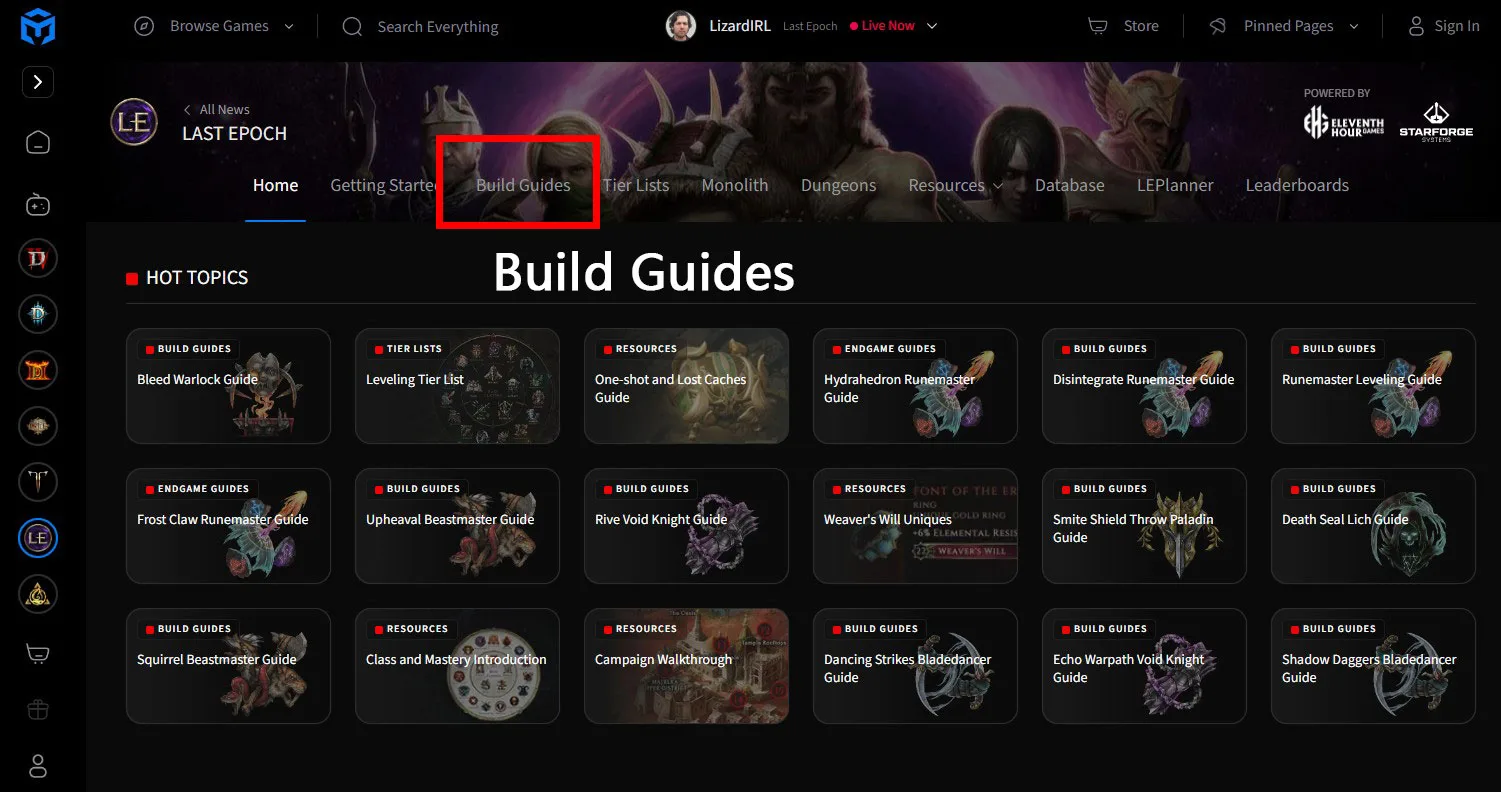
Hub navigation example: choose the section that matches your task; available labels can change.
Choosing the Right Maxroll Guide
The build guide index provides more information than the guide title alone. Entries can identify the author, last update, season, leveling or endgame status, playstyle, base class, and mastery. Filters for playstyle and mastery help reduce the list, while the archived toggle can expose material from older seasons.
Follow this order when selecting a guide:
- Set the character stage. Decide whether you need a leveling route or an endgame configuration. These are not interchangeable. A finished endgame planner can assume levels, skill points, passives, equipment, or resources that a new character does not possess.
- Match the base class and mastery. Similar skill names or playstyles do not make guides interchangeable. Confirm both labels on the guide card and again on the guide page.
- Check the season label. For the current baseline, prioritize material explicitly marked for Season 5. A Season 4 result should be treated as older material even if its title still sounds relevant.
- Read the last-updated date. The date helps distinguish a recently maintained guide from one that merely remains visible. It should be considered together with the season and changelog, not used as the only freshness test.
- Leave archived results hidden by default. Turn them on only when you deliberately want historical information or are comparing an older configuration.
- Read the introduction before opening the planner. The introduction can state the guide's assumed level, major requirements, advantages, limitations, and whether a starter configuration exists.
The Static Orb Sorcerer guide demonstrates why this screening matters. It is labeled as an endgame guide, assumes a level 80 character, says the build relies heavily on gear, and states that it has no starter planner. Those conditions are more important to a new character than the build's headline or its displayed strengths. The page directs players toward separate Mage leveling material before adopting that endgame setup.
That example is a reading lesson, not a recommendation to use that particular build. Apply the same checks to every Maxroll result you consider.
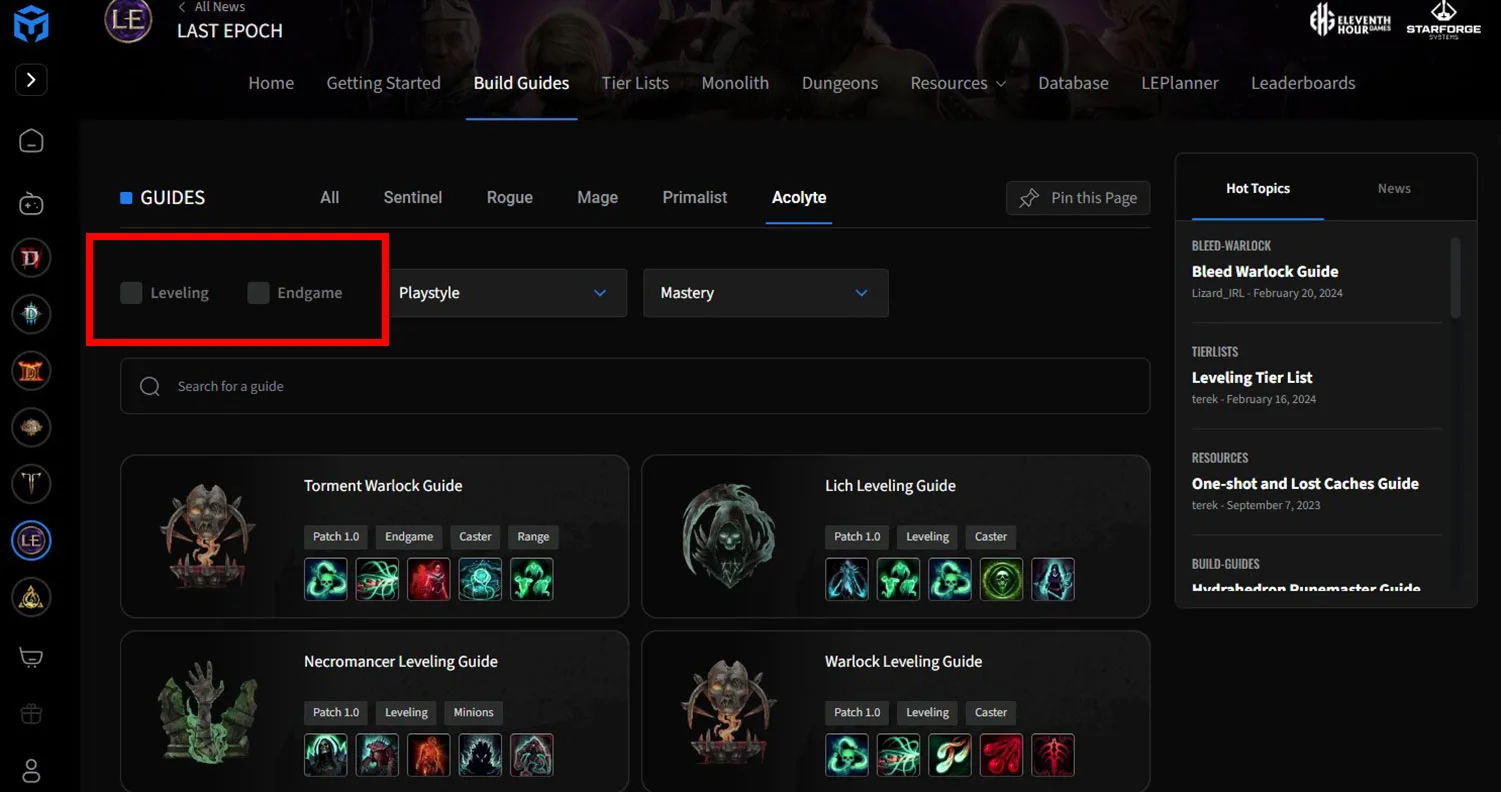
Filter interface example: check the guide category and progression stage before opening a build.
Reading a Build Guide Without Missing Its Conditions
A Maxroll build page can combine an introduction, equipment, skills, passives, a loot filter, a video, a summary, and a changelog. Read those sections in an order that preserves the author's conditions.
Introduction and Requirements
Start with the introduction rather than jumping directly to the item display. Record the guide's stated character level, intended content, important resource requirements, and any warning that the setup is expensive or item-dependent. Pros and cons can help describe its intended behavior, but explicit requirements determine whether you can actually assemble it.
A guide that says every item in its endgame planner is important should not be reduced to a list of five skills. Its skill choices may depend on bonuses, attributes, resource capacity, or interactions supplied by the equipment. Likewise, the absence of a starter planner is a clear signal that the page is not presenting a smooth early progression path.
Equipment and Variant Tabs
Next, inspect the active equipment variant. One guide can contain several substantially different setups. In the Static Orb example, the available sets include Endgame Gear, Aspirational Gear, a DPS Uber Killer variant, and a SPEED Auto Bomber variant. These names describe different goals and levels of investment.
Do not copy the equipment from one tab and the skills, passives, or gameplay instructions from another. Before taking notes, write down the exact active variant. After moving to a new section, confirm that the same set remains selected. If the page discusses alternatives, distinguish temporary substitutions from items that the author describes as central to the build.
Also look for numerical or item-based conditions stated by the guide. A requirement is not merely a desirable upgrade. If the guide ties a defensive or offensive effect to a threshold, the setup below that threshold may behave differently from the completed version.
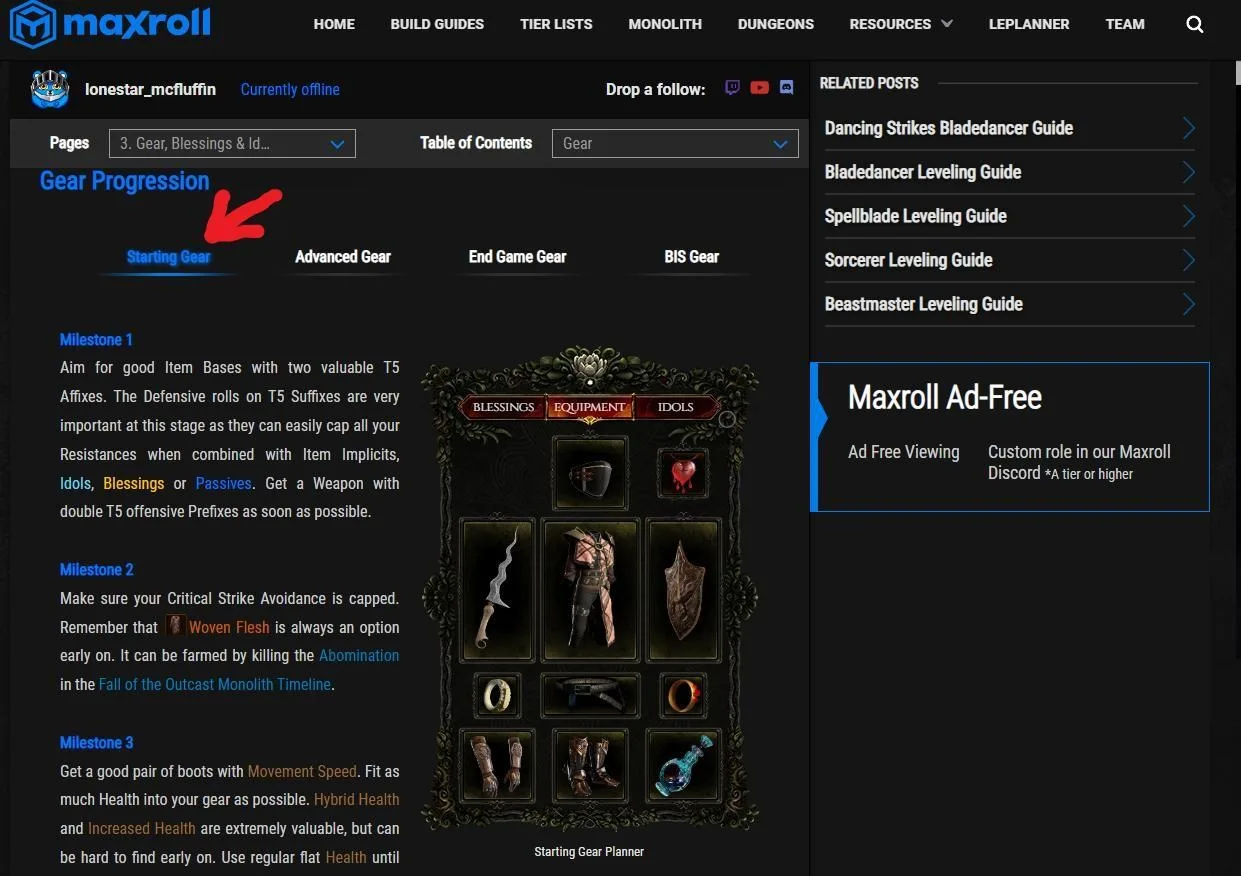
Historical equipment panel with Starting, Advanced, End Game, and BIS tabs. Current guides can use different variant labels.
Skills, Passives, and Gameplay Notes
The Skills section usually describes what each selected skill does in the build, how the skills are used, and any situational adjustments. The Passives section identifies nodes that support the same plan. Read these after choosing the equipment variant so that the instructions stay connected to the configuration they were written for.
Separate three kinds of information in your notes:
- Core actions: what the build repeatedly uses during ordinary play.
- Conditional actions: what is used during movement, recovery, dangerous attacks, or boss encounters.
- Variant-specific changes: adjustments that only apply when a named item or alternate setup is active.
This prevents a conditional instruction from becoming part of every encounter and stops a variant-specific node from being copied into the wrong configuration.
Loot Filter, Summary, and Changelog
A guide's loot-filter section belongs to that guide's item priorities. Check that you are using the filter associated with the same build stage and variant, especially if the setup depends on specific equipment.
Use the summary as a final consistency check, not as a replacement for the full guide. It can remind you of the central mechanics, but it may omit progression details, requirements, and alternatives.
Finish with the changelog. The Static Orb guide records separate updates for Season 5, Season 4, and an earlier patch. That history shows that a page can persist across multiple versions. Confirm that the newest entry corresponds to the season shown at the top, then compare that date with the current game baseline. If a later hotfix could affect the mechanic you care about, verify that issue through current official patch information before committing resources.
Finding Skill and Passive Progression
A common Maxroll problem is seeing the final skills but not knowing the order in which to allocate points. Some versions of Maxroll guides expose ordered stages in a Skills and Passives widget, using a horizontal progression bar or arrows. When those controls are present, select each skill and inspect the stages it actually offers. Their position and availability can differ between guides and interface versions.
Use this sequence when the progression widget is present:
- Open the guide's Skills and Passives area.
- Confirm that you are viewing the intended guide and variant.
- Select the passive panel to inspect the passive allocation.
- Select each of the five skills individually instead of assuming that the visible final tree shows the leveling order.
- Move the progression control backward to the earliest available stage.
- Advance one step at a time and record which points are added at each stage.
- Repeat the check after any variant change.
The interface can change over time, so the control may not always appear in exactly the same position. The important distinction is between a final snapshot and a progression sequence. If the page exposes only a completed planner and no ordered stages, do not invent a leveling order from the final allocation. Use a dedicated leveling guide with an explicit point order.
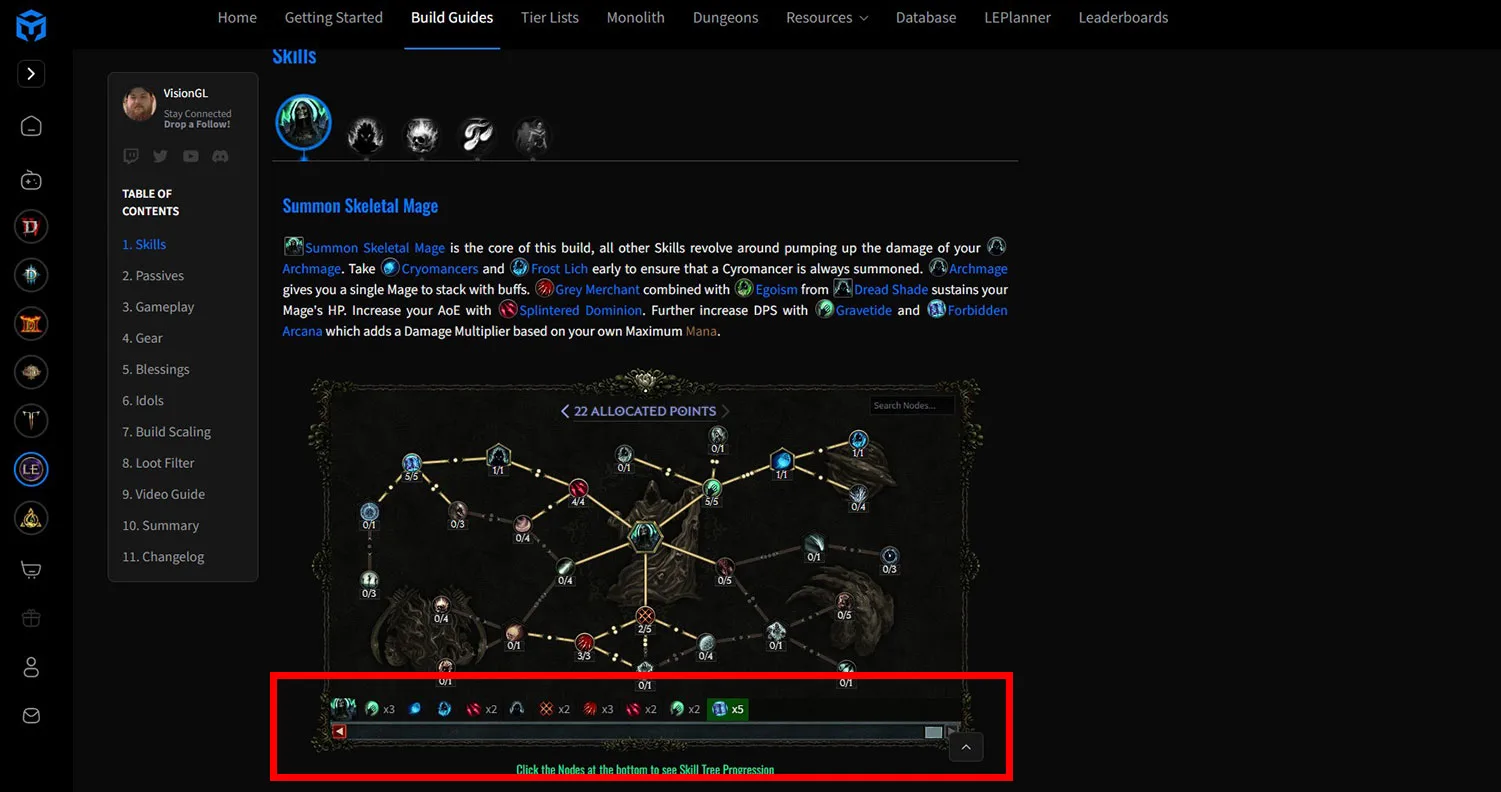
Historical Skills and Passives widget. Use ordered progression controls in guides that include them.
A Reliable Maxroll-to-Game Workflow
The following workflow keeps the useful parts of Maxroll together while exposing mismatches before they become expensive.
- Record the page identity. Note the guide title, base class, mastery, author, season, and last-updated date.
- Classify the guide. Mark it as leveling or endgame. If the page states an assumed level, record that level beside the classification.
- Capture the requirements. List mandatory items, important thresholds, and any statement that the build is gear-heavy or lacks a starter configuration.
- Choose one variant. Write its exact label at the top of your notes. Do not use a vague label such as “best setup.”
- Read the skill sequence. Use the progression controls when available. Keep the final skill trees separate from the order used to reach them.
- Read the passive sequence. Confirm that it belongs to the same progression stage and variant as the skills.
- Add gameplay conditions. Separate ordinary rotation, movement, recovery, defensive responses, and boss-specific instructions.
- Recheck equipment dependencies. Make sure the selected variant actually supplies the interactions assumed by the skill and passive notes.
- Inspect the changelog. Look for a current-season entry and compare its timing with the current game version, which is 1.5.2.1 for this review.
- Test the plan incrementally. Apply changes in a controlled order so that a missing requirement or mistaken variant is easier to identify.
This process is intentionally narrower than building a character from scratch in a planner. Its purpose is to read and apply a Maxroll guide correctly. Detailed planner operation belongs in a dedicated build-planner guide.
Common Maxroll Mistakes
Opening an Old Search Result
A search result can lead directly to a guide from an older season. Check the label on the page itself. If the build index marks it as Season 4 while the current season is Season 5, treat it as historical until the relevant mechanics are independently confirmed.
Copying an Endgame Page While Leveling
An endgame guide may assume a high-level character, developed passives, specific equipment, or large resource investment. Look for an explicit leveling guide rather than reverse-engineering an early route from a finished setup.
Treating the Planner as an Allocation Order
A completed planner answers “where the build ends,” not necessarily “what to take next.” Use progression stages, sliders, arrows, or a dedicated leveling page when the order matters.
Mixing Equipment Variants
Variant tabs can change the purpose of the setup. A speed-oriented configuration, a boss-damage configuration, and an aspirational configuration should not be treated as a single shopping list. Keep a written variant label beside every copied skill, passive, and equipment note.
Ignoring Gear Requirements
A guide can describe strong performance while also warning that it is unique-heavy or investment-dependent. The requirement statement controls whether that performance description applies to your character.
Reading Only the Summary
The summary is compact by design. It may not repeat the assumed level, the reason a particular item is necessary, the progression order, or the limits of an alternate variant. Use it after reading the detailed sections.
Treating a Tier List as a Universal Answer
A tier list reflects its own categories and assumptions. It does not automatically tell you which build fits your available equipment, preferred playstyle, character stage, or intended activity. Use the list to create a shortlist, then evaluate the actual guide.
Assuming a Season Label Covers Every Hotfix
A guide may be correctly labeled for the current season but predate a later hotfix. When a decision depends on a recent bug, balance adjustment, or interaction change, consult current official patch information before relying on the third-party explanation.
Maxroll Use Cases and Stop Conditions
| Your task | Appropriate Maxroll destination | Stop and verify when |
|---|---|---|
| Find a current authored build | Build Guides with Season 5 and stage filters | The page is archived, older-season, or missing clear requirements |
| Learn the order of skill points | Skills and Passives progression view | Only a final allocation is visible |
| Compare setup variants | Equipment variant selector | Notes from different tabs appear to conflict |
| Understand a guide's intended play | Introduction, Skills, and Summary | The required gear or threshold is not available |
| Check maintenance history | Changelog and last-updated label | The relevant mechanic changed after the newest entry |
| Confirm a recent game fix | Official current patch information | The answer depends on a hotfix rather than the guide's overall plan |
Final Checklist
Before following any Maxroll Last Epoch guide, confirm all of the following:
- The guide matches your base class and mastery.
- It is labeled for Season 5 rather than an older season.
- Its last-updated date and changelog are visible.
- You know whether it is a leveling or endgame guide.
- Your character meets the stated level assumption.
- You understand every mandatory item or threshold.
- One equipment variant is selected and named in your notes.
- Skills, passives, and gameplay instructions come from that same variant.
- Progression order is taken from ordered stages, not guessed from the final planner.
- Recent hotfix-dependent claims are checked against current official information.
If any of these checks fails, pause before spending crafting materials or reorganizing the character. Maxroll is most useful when its guide metadata, requirements, progression controls, and changelog are read together.