Last Epoch mods are available, but they are third-party PC projects rather than a built-in Steam Workshop ecosystem. On version 1.5.2, the safest approach is to use full offline mode, create or select an offline character, confirm that the exact mod version supports Season 5, and install only the dependencies named by its author.
Do not assume an old download remains compatible because the project is popular or still has an active discussion page. Game updates can affect loaders, interfaces, item data, and gameplay hooks. This matters especially for the older Last Epoch Mods HUD package: its public page and repository show several different historical version markers, but none confirms that the original package supports 1.5.2.
Online and offline characters cannot be transferred between modes. If you want to experiment with gameplay-changing mods, start with an offline character instead of expecting to move an existing online character into a modded environment.
The current Last Epoch modding landscape
For the projects covered here, discovery and distribution happen through community pages on Nexus Mods and GitHub. There are current Season 5 utilities, older standalone tweaks, framework dependencies, and large offline trainers. They do not all share one installation method.
A useful first distinction is what the word “mod” means in this context:
| Term | What it means | Installed into the game |
|---|---|---|
| Community mod | Third-party code, assets, interface changes, or gameplay changes | Yes |
| Item affix or modifier | A normal statistic attached to an in-game item | No |
| Loot filter | Rules controlling which dropped items are shown | Not the same as a loader-based mod |
| Build planner or database | An external tool for planning skills and equipment | No |
| Framework | A dependency used by other mods, such as ItemFramework | Sometimes, when another mod requires it |
The distinction prevents two common mistakes. A planner recognizing every item modifier does not mean it modifies the game, and an item pack requiring ItemFramework cannot be installed as if it were a single self-contained file.
The practical boundary is offline play. Several current projects explicitly describe themselves as offline or single-player tools. CCG LE Mod goes further and automatically disables online. Treat gameplay-changing mods as offline-only unless the individual project gives an explicit, current statement that says otherwise.
Check these conditions before installing anything
Use this checklist before choosing a download:
- Confirm your game version. The current verified game baseline is 1.5.2. A mod labeled for Season 5 or version 1.5 is a better candidate than a package whose last compatibility note names 1.4.2.1.
- Use a full offline character. Online and offline characters cannot be converted or transferred. Make this decision before investing time in the character.
- Read the complete requirements. Some projects require MelonLoader. Heirs of the Ages specifically requires ItemFramework 1.9.2. Installing only the visible content pack will not satisfy that dependency.
- Check the mod’s known limitations. Terrible Inventory, for example, currently lists Quick Teleport as broken even though the rest of the mod is described as updated for Season 5.
- Back up local saves and configuration. A mod may change item data, character state, interface settings, or progression. Preserve an unmodified copy before testing it.
- Install one mod at a time. Launch and test after each addition. If the game stops loading or an interface disappears, you will know which change introduced the problem.
- Do not substitute generic instructions for author instructions. Loader-based mods, visual injectors, scripts, frameworks, and item packs can require different procedures.
A recent upload date is useful, but it is not a compatibility guarantee. Look for an explicit supported game version, a Season 5 statement, named dependencies, and a recent description of any broken feature. If those details are absent, treat compatibility as unconfirmed.
Useful Last Epoch mods for Season 5
The strongest current choices solve a specific problem instead of changing every part of the game at once.
Death analysis and build feedback
Terrible Logs – Death Assessment and Death Counter is described as a Season 5 mod. It records deaths, identifies what killed the character, stores gear assessments, and includes experimental boss notes. Its purpose is diagnostic: compare deaths before and after improving equipment, then see whether the defensive change helped.
This is more focused than a general trainer and is suitable when your main problem is unexplained deaths. It does not replace an official combat log, and experimental boss notes should not be treated as a complete record of every encounter.
LeHelper combines several utility functions in one in-game menu, including a damage meter, build-guide support, progress tracking, map utilities, and visual-performance controls. It is broader than Terrible Logs, so test it alone before combining it with other interface utilities.
Loot readability and inventory convenience
Terrible Tooltips adds color-coded affix tiers, grade letters, and brackets on ground labels. It is described as updated for Season 5 and is intended to make item quality easier to read at a glance.
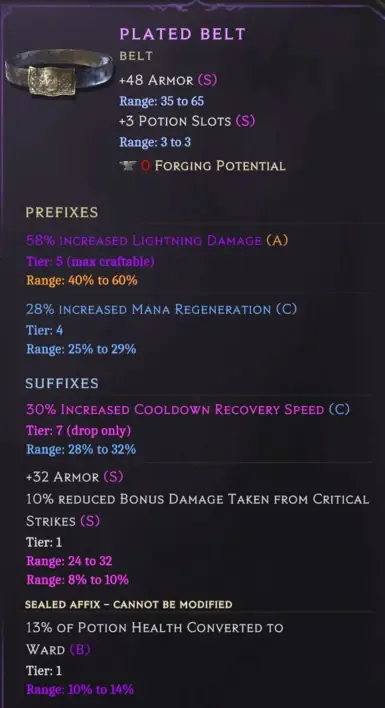
Terrible Tooltips makes affix tiers and grades readable at a glance.
Terrible Inventory adds STASH, STASH ALL, and VENDOR controls to reduce repetitive inventory work. It is also described as updated for Season 5. Its listing warns that Quick Teleport is currently broken, so install it for the inventory controls rather than assuming every included function works.
Damage Number Colors colors damage numbers according to damage type. It is a narrow visual change and may suit players who want clearer combat feedback without adding progression or item-changing features.
Camera, cooldown, and map visibility tools
Terrible Zoom provides additional camera controls, including a farther zoom range, scroll-wheel adjustment, and camera tilt. The End key opens its settings, and it requires MelonLoader. It is described as updated for Season 5.
Terrible Cooldowns displays floating skill icons above the character while abilities are on cooldown. It supports keyboard, Xbox, and PS5 control layouts with automatic detection and custom labels. This is primarily a combat-readability tool.
Terrible fog_OF_war offers six levels of fog-of-war control and is described as an offline single-player mod updated for Season 5. Anti-fog is an older alternative that expands the minimap reveal radius, but its listing dates from 2025 and does not establish 1.5.2 compatibility.
Last Epoch – Corruption Viewer exposes corruption information on the map without entering the Echo Web. Its listing is considerably older than Season 5, so verify compatibility before relying on it.
Automation and interaction convenience
Auto-Enabler automatically activates nearby shrines, caches, chests, beasts, prisons, and similar interactable objects. It includes in-game settings. Because it changes normal interaction behavior, test it with a separate offline character and confirm that it does not conflict with another automation mod.
Last Epoch Hotkeys is an AutoHotkey utility for common repetitive actions. It is a script rather than the same kind of in-game mod as a MelonLoader package. Follow its own controls and setup instead of placing it wherever a loader-based mod would go.
New items and difficulty changes
ItemFramework lets players define custom unique items, set items, and affixes through JSON files. It is a framework, not a ready-made item collection. Install it when a chosen content pack lists it as a dependency.
Heirs of the Ages adds 300 equipment items: 50 four-piece sets and 100 standalone unique items across all five classes and levels 1–100. It is made for offline Last Epoch and requires ItemFramework 1.9.2. The separate English and French editions are alternatives, so choose the edition appropriate to your game rather than treating them as two packs to combine.
PoE Item Pack adds custom items based on equipment from Path of Exile. Its short listing does not provide the same detailed dependency and compatibility information as Heirs of the Ages, so check its own requirements before installation.
DifficultyFramework is designed to increase difficulty through larger groups of enemies and additional events. Its description recommends creating a new character. Follow that boundary rather than applying it first to an established save.
Death Rush adds a unique ring that grants short-lived buffs after killing an enemy. It is an older, focused content addition. Confirm that its item implementation and any dependencies remain compatible with 1.5.2.
Large offline control tools
CCG LE Mod is an offline trainer and control application rather than a small quality-of-life tweak. It includes item spawning and building, automatic pickup, drop controls, crafting controls, unlocks, free respecialization, Monolith tools, and player options. It is single-player only and automatically disables online.
Choose a tool this broad only when you actually want to change progression or test systems. If your goal is simply clearer tooltips or a wider camera, a focused mod introduces fewer overlapping changes and is easier to troubleshoot.
The older Last Epoch Mods HUD package
The package commonly titled Last Epoch Mods or LastEpoch Mods includes a large collection of controls for item drops, automatic pickup, scene density, experience, prerequisites, dungeons, Monolith objectives, minions, companions, character data, and other systems. Its repository names MelonLoader as a requirement.
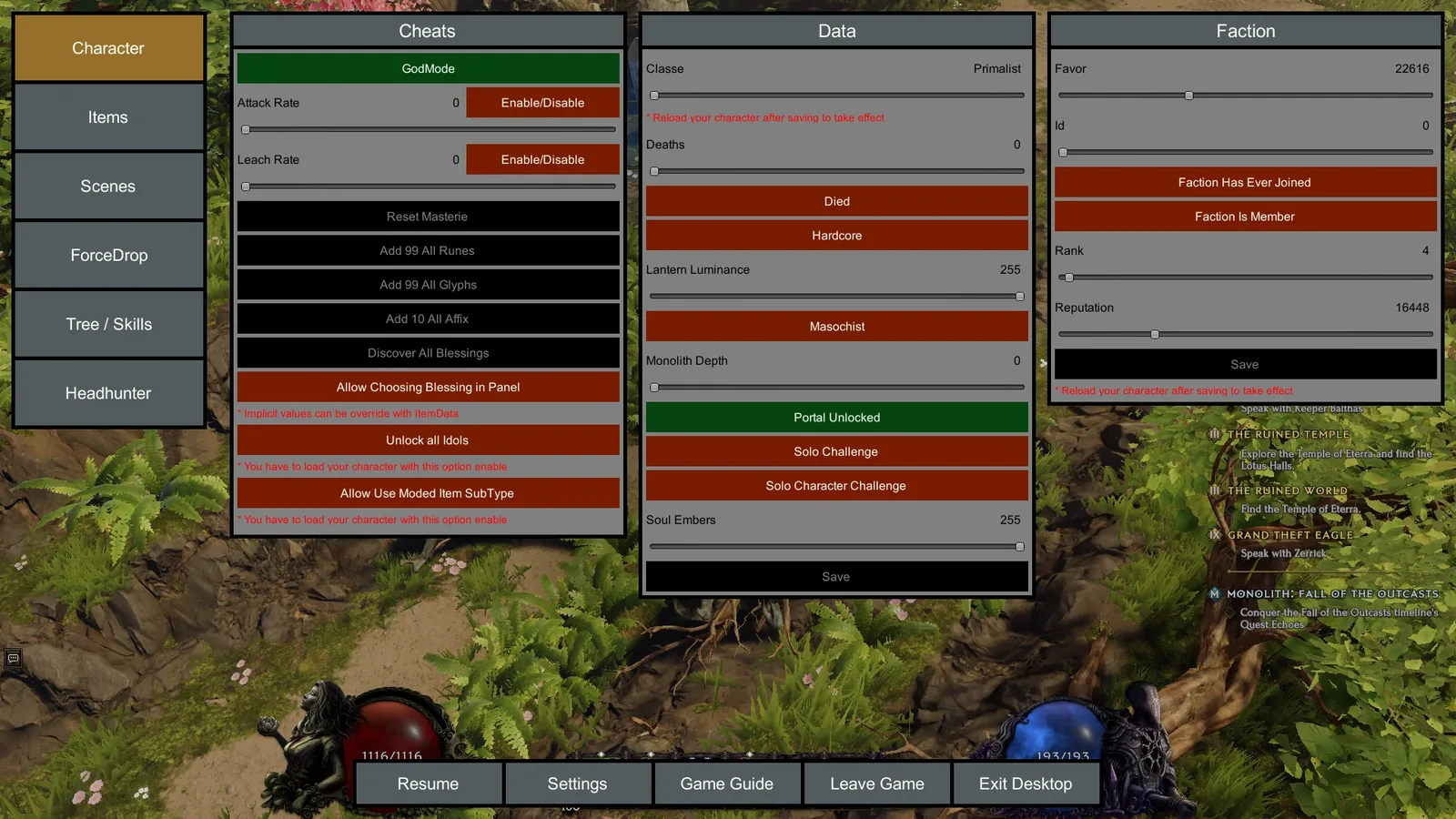
The older Last Epoch Mods package exposes broad character and gameplay controls in one HUD.
Its current compatibility is not clear enough to recommend the original download for version 1.5.2:
- The Nexus page displays version 4.4.5 and a last update in July 2025.
- A pinned page note names Last Epoch 1.4.2.1.
- The repository release list shows Hud v4.4.7 from August 2025.
- Community comments mention newer forks, including a claimed 1.5 fork, but those comments do not verify the original package against 1.5.2.
Do not mix files from the old Nexus package, a repository build, and an unofficial fork simply because they share a name. Identify one maintained branch, confirm its supported game version, and follow that branch’s own instructions. If the instructions are available only through an inaccessible community channel, choose a project with self-contained installation documentation instead of guessing at folders or dependencies.
A safe installation sequence for loader-based mods
There is no reliable universal folder procedure for every project in this ecosystem, but the following sequence works as a decision process without inventing missing installation details:
- Select one exact project and release. Record its name, release identifier, supported game version, and required framework or loader.
- Confirm offline use. Start from a full offline character or create a disposable offline test character. Do not plan around converting an online character later.
- Make a clean baseline launch. Start unmodified version 1.5.2 once and confirm that the game and test character load normally.
- Back up the local state. Preserve saves and any configuration that the selected project may change.
- Install the named loader only when required. Terrible Zoom and the LastEpoch Mods repository name MelonLoader. Heirs of the Ages instead names ItemFramework 1.9.2 as its content dependency.
- Follow the selected project’s release instructions exactly. Do not borrow paths, launcher files, or configuration names from a different mod.
- Launch directly into offline play. Confirm that the mod’s menu, visual change, item content, or utility appears before adding anything else.
- Test the smallest relevant action. Open a tooltip for Terrible Tooltips, move an item for Terrible Inventory, adjust the camera for Terrible Zoom, or inspect a recorded death for Terrible Logs.
- Exit and relaunch. Verify that settings and the offline character still load correctly.
- Add the next mod only after the first remains stable. Keep a record of the order so you can reverse the most recent change first.
For a visual injector such as RenoDX or a ReShade preset, use that project’s own graphics instructions. For an AutoHotkey utility, use its script controls. For a framework-backed item pack, satisfy the framework version first. These categories should not be installed interchangeably.
Troubleshooting common mod problems
The game launches but the mod does not appear
Check whether the project requires MelonLoader, ItemFramework, a separate launcher, or another prerequisite. Confirm that the dependency version matches the mod description. Then verify that you installed the release intended for your game version rather than an older archive.
If the project sends users elsewhere for installation instructions and you cannot access those instructions, stop there. Guessing may produce a launch failure without proving whether the mod itself is incompatible.
The game stops loading after an update
Remove or disable the most recently added mod and return to the clean baseline. A mod marked for 1.4.2.1 should not be treated as compatible with 1.5.2 unless its maintained release explicitly says so. Reinstalling the same outdated files will not resolve a version mismatch.
One feature works and another does not
Read the mod’s known limitations before changing the entire installation. Terrible Inventory explicitly lists Quick Teleport as broken while advertising its stash and vendor controls. A single broken feature does not automatically identify a loader failure.
Two interface mods overlap
Utilities such as LeHelper, Terrible Cooldowns, Terrible Tooltips, and Terrible Inventory can all change visible interface behavior. Test each separately. If both work alone but fail together, keep the one that solves the more important problem instead of layering additional fixes.
A modded character cannot move to online mode
This is expected. Online and offline characters are separate and cannot be transferred. Continue with the offline character or return to an independently created online character without the modded progression.
Choose the smallest mod that reaches your goal
Use a focused choice before installing a large package:
- For unexplained deaths, start with Terrible Logs.
- For easier item reading, start with Terrible Tooltips.
- For inventory buttons, use Terrible Inventory while avoiding its broken Quick Teleport feature.
- For camera control, use Terrible Zoom with its required MelonLoader setup.
- For custom equipment packs, install the exact framework version required by the pack.
- For sweeping offline progression controls, consider CCG LE Mod only after deciding that a trainer is actually the desired experience.
- For the older LastEpoch Mods HUD collection, wait for explicit 1.5.2 compatibility from the maintained release you intend to use.
That approach keeps failures diagnosable, protects an unmodified backup, and avoids confusing an old community package with confirmed Season 5 support.