
You can change your Mastery in Last Epoch. Travel to the End of Time, speak to Chronomancer Lerinne, and select Respecialize Mastery. Lerinne can respec passive points from several towns, but the option to change your actual Mastery is available only from her End of Time location.
Changing Mastery is not a complete class change. You remain the same base class and choose one of its other two Masteries. The change costs gold, resets all of your passive points—including points in the base-class tree—and leaves your currently equipped gear in place. The confirmation screen shows the gold price you must pay, so check the displayed amount rather than relying on an old fixed-cost claim.
Mastery Change at a Glance
| Question | Answer |
|---|---|
| Can you change Mastery? | Yes. Mastery is no longer a permanent choice. |
| Where is the option? | Chronomancer Lerinne in the End of Time. |
| Which map icon identifies Lerinne? | A purple brain icon. |
| Can a town version of Lerinne change Mastery? | Town versions can respecialize passive points, but changing Mastery is restricted to the End of Time. |
| Can you change your base class? | No. You choose between the other Masteries belonging to your existing base class. |
| Does changing Mastery reset passives? | Yes. All passive points are reset, including base-class points. |
| Does your gear disappear? | No. Equipped gear remains equipped, although it may not support the new build. |
| Is the price always the same? | No. Use the amount displayed by the game when you open the Mastery change. |
The practical consequence is that a Mastery change is closer to a major build rebuild than a quick toggle. You keep the character and its equipped items, but you should expect to reconstruct the passive allocation, review the skill bar, and replace equipment that was chosen for the old Mastery.
Where to Change Mastery
Open the map for the End of Time and look for Chronomancer Lerinne’s purple brain icon. Guides commonly place her just south of the waypoint. Make sure you are speaking to Lerinne in this specific hub: finding the same NPC during another part of the campaign does not guarantee that the Mastery dialogue will appear.
You do not need to finish the entire campaign merely to use this feature. You need access to the End of Time and its correct Lerinne instance. Once that destination is available, travel there directly instead of trying every passive-respec NPC in later towns.
Do not confuse Lerinne with Chronomancer Nyx. Nyx uses a gold brain icon and manages equipped Blessings near the Monolith of Fate gates. Lerinne uses the purple brain icon and handles passive or Mastery respecialization.

Lerinne's dialogue offers the actual Mastery respecialization option.
Prepare Before Paying for the Change
A Mastery switch can leave a functioning character with no allocated passives and a skill setup that no longer matches its available abilities. A short preparation pass prevents the most common problems.
- Choose the destination Mastery first. The menu offers the other two Masteries from your current base class. Decide which one you want before opening the confirmation screen.
- Save a record of the intended passive allocation. All passive points are reset, including base-class points. A screenshot or written sequence helps you restore essential defenses and unlock requirements before spending optional points.
- Check the new build’s skill requirements. Skills can be unlocked through character level, passive investment, or the selected Mastery. A skill associated with the old Mastery should not be treated as a guaranteed part of the new setup.
- Inspect your equipment. Gear remains equipped after the switch, but affixes or effects chosen for the old Mastery may be irrelevant to the replacement build. Prepare suitable pieces before committing if the current setup depends heavily on Mastery-specific interactions.
- Keep enough gold available. The game presents the applicable cost during the process. Because the price is not a universal fixed number, the confirmation screen is the reliable place to check it.
- Plan a safe fallback setup. Put together enough compatible passives, skills, and equipment to resume ordinary combat. Do not commit immediately before content that requires the finished version of the new build.
You do not need to manually remove every passive point before changing Mastery. The Mastery change itself resets the entire passive allocation. Spending gold on a separate point-by-point respec first only adds work unless you are testing something before the full switch.
How to Change Mastery Step by Step
- Travel to the End of Time. Use the waypoint and confirm that the area name is the End of Time rather than another town containing a version of Lerinne.
- Find the purple brain icon. This icon marks Chronomancer Lerinne. Do not follow the gold brain icon used for the Blessing vendor.
- Speak to Chronomancer Lerinne. Open her dialogue and look for the option labeled Respecialize Mastery.
- Avoid the passive-only option. Respecialize Mastery Point allocations opens the passive tree for individual point removal. It does not replace the selected Mastery.
- Open the Mastery selection. The game displays the other two Masteries available to your current base class.
- Select the intended Mastery. Recheck the name before continuing. This changes the specialization within the class; it does not turn an Acolyte into a Rogue, a Mage into a Sentinel, or otherwise replace the base class.
- Review the displayed gold cost. Costs reported in older guides may not match the number on your current character. Treat the in-game confirmation as authoritative for the transaction.
- Confirm the change. After payment, the new Mastery becomes active and all passive points are reset for reallocation.
- Open the passive screen immediately. Rebuild the base-class foundation first, then invest toward the nodes required by the new Mastery setup.
- Review the Skills window and action bar. Confirm which skills are now known, which are specialized, and which remain appropriate for the new build.
- Recheck every equipped item. Items remain equipped, but remaining equipped is not the same as remaining useful. Replace pieces whose bonuses no longer affect your chosen damage type, defenses, or skills.
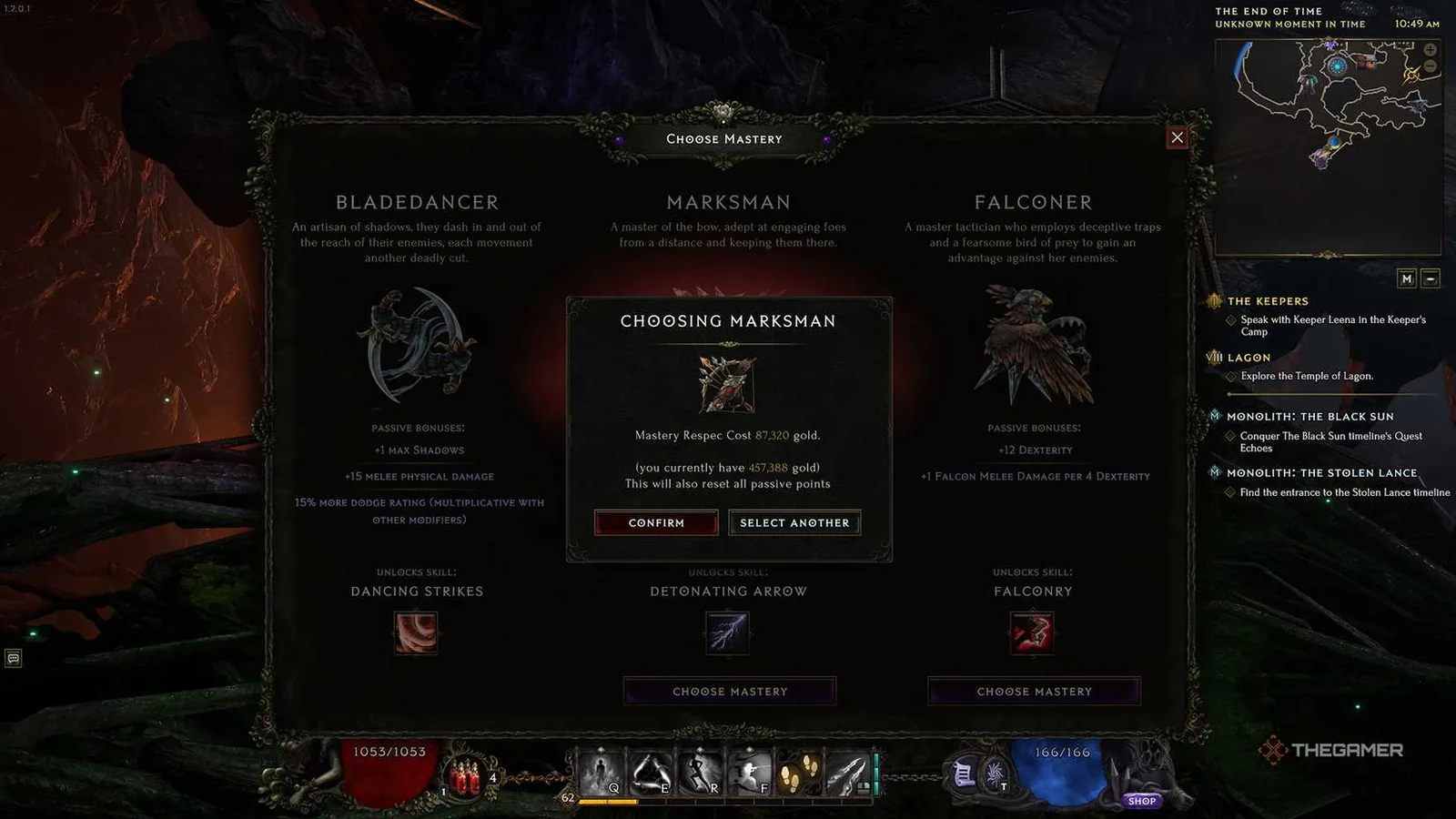
The confirmation dialog shows the selected Mastery and respec cost before confirmation.
What Changes After You Confirm
The Mastery selection and passive allocation change together, but other respec systems have separate rules. Keeping those systems distinct makes the rebuild easier.
| Character system | Result or required action |
|---|---|
| Base class | Remains unchanged. The new selection is another Mastery within that class. |
| Selected Mastery | Changes to the option you confirmed with Lerinne. |
| Base-class passives | Reset and must be allocated again. |
| Mastery passives | Reset and must be rebuilt in the new Mastery tree. |
| Equipped gear | Stays equipped, but its bonuses may no longer fit. |
| Available skills | Must be reviewed because some skills unlock through the selected Mastery or passive investment. |
| Skill specialization trees | Managed separately through the Skills window, not through Lerinne’s passive-point interface. |
| Blessings | Managed separately by Chronomancer Nyx in the End of Time. |
The full passive reset is the most important immediate effect. Do not enter combat simply because the equipment panel still looks complete. Your defenses, damage scaling, skill unlocks, and other build functions may depend on passive nodes that are now unallocated.
Reinvesting passive points does not require you to earn those points again. This differs from skill specialization points: passive points become available for immediate reallocation, while skill points above the current Minimum Skill Level may need to be re-earned when you remove them or despecialize a skill.
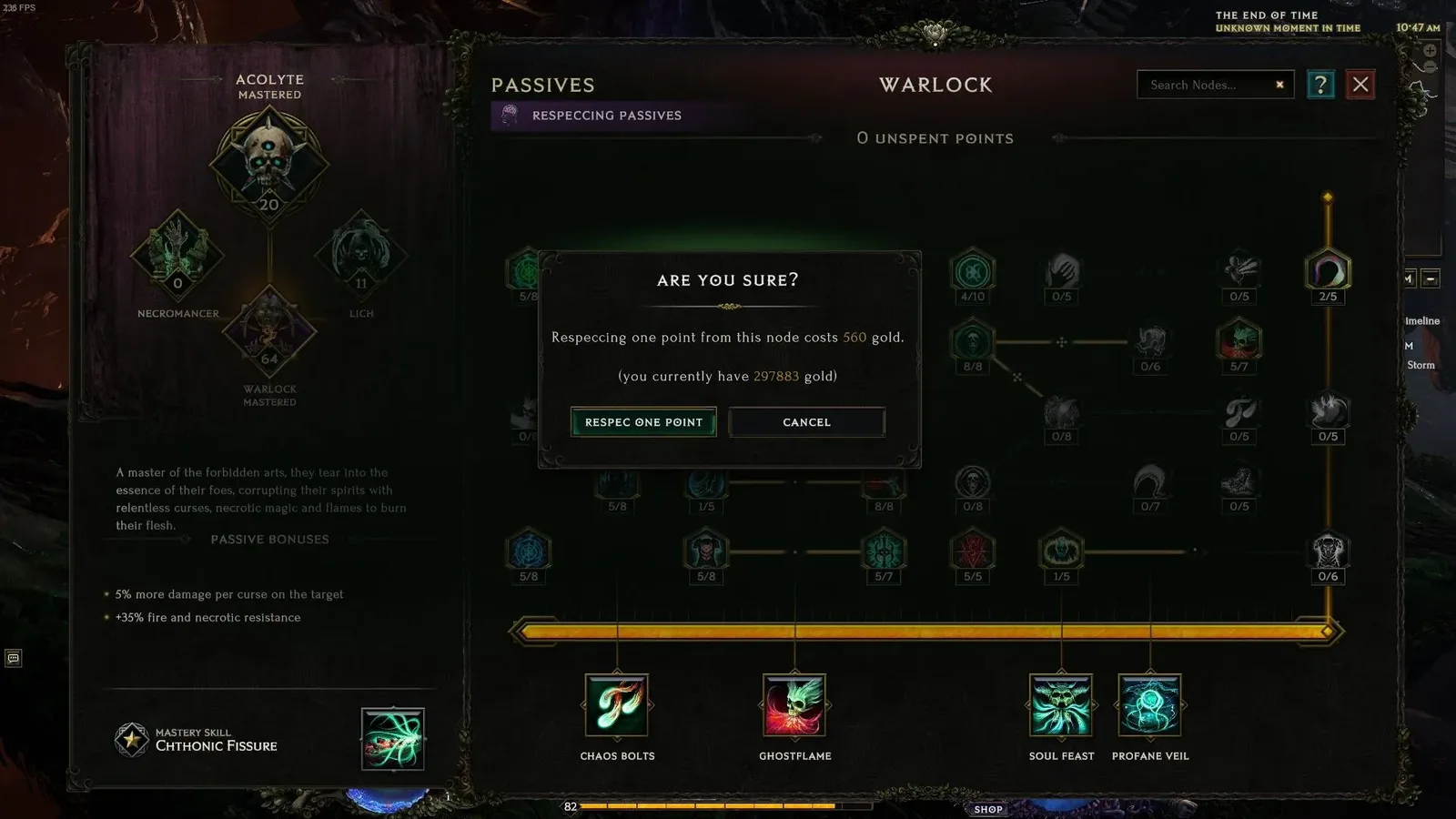
This passive-respec interface illustrates individual point removal. A Mastery change resets the full allocation.
Rebuild the Character After the Switch
Start with requirements rather than damage bonuses. The goal of the first allocation is to produce a usable character, not to recreate a finished planner in a random order.
Reallocate the base-class foundation
Spend the base-class points needed to reach the parts of the new Mastery tree used by your build. Restore fundamental defensive or resource-related nodes before optional damage. If a desired skill unlock depends on passive investment, satisfy that requirement before arranging the action bar.
Passive-tree dependencies still matter during later edits. When removing points individually, the game will not allow a change that causes an invested higher node to lose its prerequisite. Allocating the rebuilt tree from its foundation upward makes these dependencies easier to follow.
Review every specialized skill
Open the Skills window, which is bound to S by default, and inspect the specialized skills one at a time. Skills may unlock through level, passive investment, or Mastery selection, so the set that supported the previous Mastery may not be the right set for the new one.
If you remove points from a specialized skill, points at or below the displayed Minimum Skill Level can be reassigned immediately. Points above that minimum must be earned again. If you use Despecialize Skill to replace a skill entirely, the newly specialized skill begins at the character’s Minimum Skill Level and may receive bonus experience to catch up.
Do not despecialize all five skills without a replacement plan. It is usually safer to establish the new build’s main damage skill first, then change its support, movement, defense, and utility skills in a controlled order.
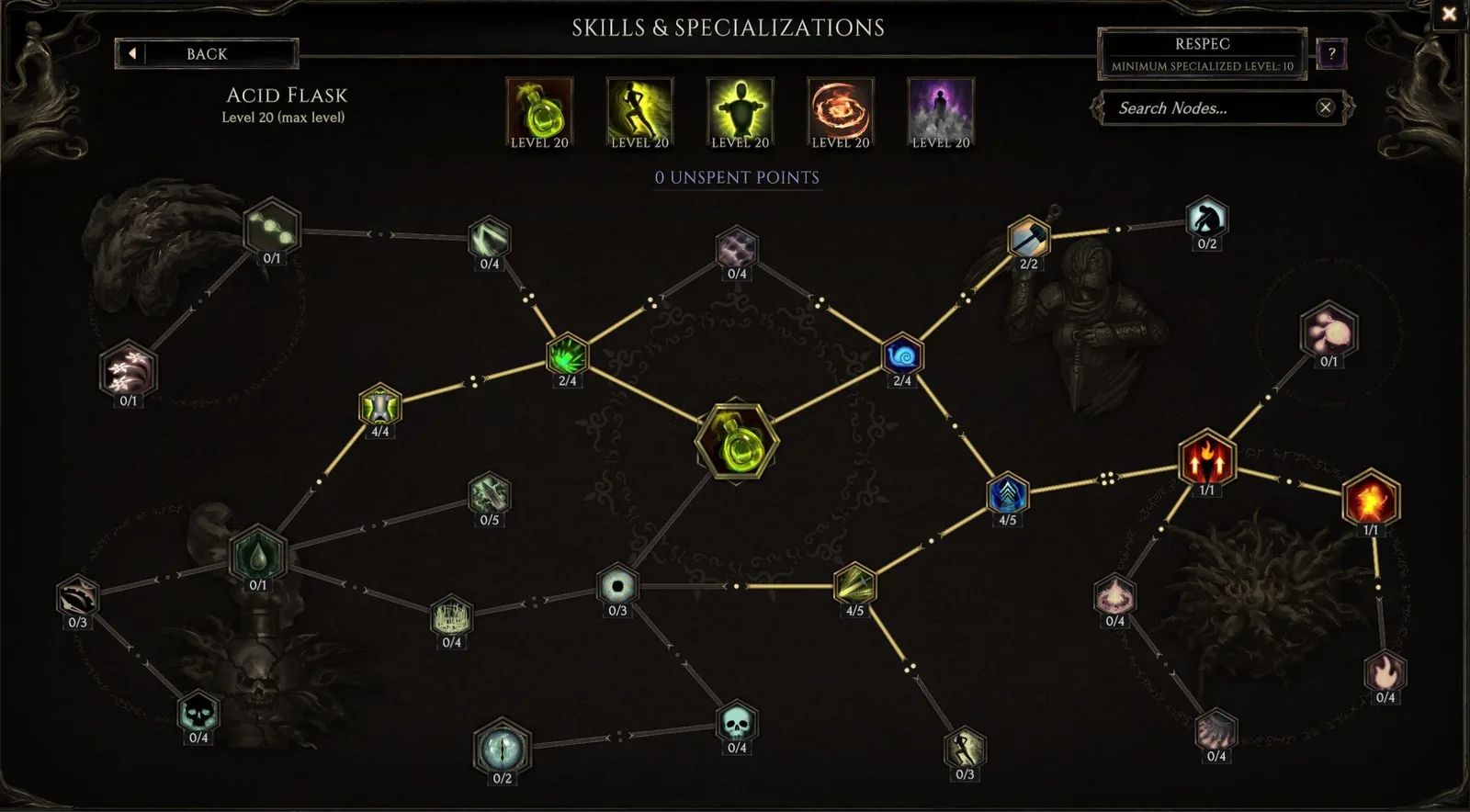
The skill-specialization screen separates skill recovery from passive-tree respecialization.
Audit the equipped gear
Gear remains equipped through the Mastery change, which prevents an empty equipment screen but can disguise a broken build. Read each item again and separate broadly useful bonuses from bonuses tied to the old setup.
Prioritize replacements when an item mainly supports:
- A skill the new Mastery cannot use or no longer equips.
- A damage type absent from the new setup.
- A defensive mechanic the new passive tree does not support.
- A resource interaction that the replacement skills do not need.
- A Mastery-specific effect that no longer contributes to the character.
You do not need perfect equipment before testing the new Mastery. You do need a coherent set of skills, passives, and items that all support the same basic plan.
Missing Mastery Option Troubleshooting
If Lerinne only offers passive-point respecialization, check the location before assuming the character cannot change Mastery.
- Verify the zone name. Mastery changes are available from Lerinne in the End of Time, not from every town version of the NPC.
- Verify the NPC icon. Lerinne has the purple brain icon. The gold brain icon belongs to Nyx and leads to Blessing management.
- Read both respec labels carefully. The option mentioning Mastery Point allocations changes passive points. The shorter Respecialize Mastery option changes the actual Mastery.
- Confirm that the End of Time has been reached on the character. If the destination is not yet available, continue until the hub is unlocked naturally.
- Reopen the conversation. Close the dialogue, move away, return, and inspect the available choices again before spending gold on anything else.
- Report a persistent interface problem. If the character is at the correct Lerinne location and the Mastery option is still absent or mislabeled, use the in-game bug-report tool with F8 or submit a support request. Include the zone, selected language, character mode, current Mastery, and a screenshot of the dialogue choices.
Being on a standard rather than seasonal character is not a reason to visit a different respec system. The decisive location rule is the End of Time. Likewise, the passive-respec option appearing successfully does not prove that you are at the Lerinne instance capable of changing Mastery.
Final Check Before Resuming Combat
Before leaving the End of Time, open each character panel once and verify the rebuild as a complete system:
- The intended new Mastery name is active.
- All available passive points have been allocated deliberately.
- Required passive thresholds and skill unlock conditions are satisfied.
- The action bar contains usable skills rather than assumptions from the old build.
- Specialized skills support the new plan, and any skills being releveled are understood.
- Equipped gear contributes useful bonuses to the replacement skills and defenses.
- The character has a workable damage skill, movement option, and defensive plan before entering demanding content.
A Mastery change saves you from leveling another character of the same base class, but it does not automatically translate the old build into the new one. Treat the confirmation as the start of a rebuild: select the Mastery at the End of Time, restore the passive foundation, verify skill access, and then align the equipment with the result.