Use Last Epoch Tools when you need structured game data, build records, character planning, account or save imports, loot-filter starting points, checklists, ladders, or character profiles. Use Maxroll when you want a curated explanation or progression guide. Use the official Last Epoch forum for patch notes, announcements, and developer-confirmed changes. Community discussions can help diagnose unusual behavior, but they should not overrule current game data or official notes.
The current game baseline for this page is hotfix 1.5.2.1, released during Season 5: Rage of the Frostborn. Check the version shown by a tool before trusting its numbers or copying a build. A planner labeled 1.5.2 may still be useful, but that label alone does not prove that every 1.5.2.1 bug fix is represented.
Tools on this wiki
| Decision | Open this tool | What it shows |
|---|---|---|
| Which setup fits my character? | Build finder | Mastery, playstyle, progression stage, gear commitment and linked configurations |
| What changes between my shortlisted builds? | Build comparison | Up to three setups side by side, with source status and transition cautions |
| Where can I find an item? | Item finder | A curated set of item levels, slots, acquisition sources and related setups |
| Which timeline supplies a blessing? | Blessing finder | Timeline, normal or empowered mode, effect and documented value range |
| Which uniques were introduced in Season 5? | Season 5 unique finder | Source-confirmed seasonal additions and their farming or build implications |
These finders help narrow a decision. A complete character planner remains an external tool; use the workflow below when you need to enter equipment rolls, passive points and skill specializations.
Pick the tool that matches the task
| What you need to do | Best starting point | What to verify before acting |
|---|---|---|
| Identify an item, skill, ailment, minion, dungeon, or encounter | Last Epoch Tools resource databases | Game version, item variant, class restrictions, and whether the result is historical |
| Inspect a shared character setup | Last Epoch Tools Build Planner | Season, version, equipment rolls, enabled conditions, buffs, and required uniques |
| Find candidate builds | Last Epoch Tools Build Guides or Builds | Season and version first, then mastery, skill, required uniques, and guide update date |
| Follow a written progression explanation | Maxroll guides | Whether the guide covers leveling, endgame, or a specific patch |
| Confirm a change or reported bug fix | Official forum patch notes | Exact patch number and the date of the official post |
| Check missing progression rewards | Last Epoch Tools Checklist | Correct character and whether the relevant quests have actually been completed |
| Compare ladder results or inspect a public character | Ladders or Character Profiles | Mode, season, class, and whether the profile represents the setup you are researching |
| Investigate a strange interaction | Official forum first, then community reports | Reproduction details, current version, online or offline mode, and whether the issue was fixed later |
This separation matters because the tools solve different problems. A database can tell you what an object contains, but it does not automatically tell you whether that object is practical for your character. A guide can explain a route, but its screenshots or recommendations can become outdated. A planner can calculate a configured state, but only from the equipment, passives, skills, conditions, and rolls entered into it.
Map the Last Epoch Tools sections before searching
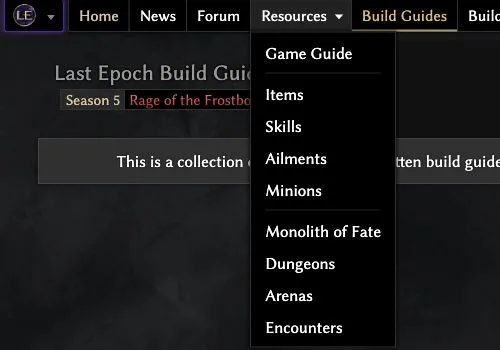
Resources menu captured October 10, 2026. Select the database that matches the mechanic you need to check.
Last Epoch Tools divides its coverage into two broad groups. The resource side includes the Game Guide, Items, Skills, Ailments, Minions, Monolith of Fate, Dungeons, Arenas, and Encounters. The character-and-build side includes Build Guides, Builds, Build Planner, My Builds, Loot Filters, Checklist, Ladders, and Character Profiles.
Start in the resource group when your question is about a game object or mechanic. Start in the character-and-build group when your question is about how several objects fit together. This prevents a common mistake: opening a complete build when you only needed to confirm one skill tag, or reading an isolated item page when your real problem is the set of conditions assumed by a planner.
The site is a third-party resource and states that it is not affiliated with Eleventh Hour Games. That does not make its structured data unusable; it means official announcements and patch notes remain the authority for release status, hotfixes, and intentional behavior.
Use a version-first lookup workflow
A reliable lookup begins with the version rather than the item name. Follow this order whenever a result could affect crafting, gearing, or a build decision:
- Record the game version you are actually playing. As of October 10, 2026, the current hotfix is 1.5.2.1. If the tool displays only a broader branch such as 1.5 or 1.5.2, note the difference instead of assuming perfect alignment.
- Choose the narrowest relevant database. Search Items for an item, Skills for a skill, Ailments for an ailment, and Minions for a minion. Use the Monolith, Dungeon, Arena, or Encounter sections for activity-specific context.
- Check restrictions before comparing values. Confirm class or mastery availability, equipment slot, item rarity, and any state that changes the displayed result.
- Separate base information from a configured build. A database entry describes the object. A planner link may add affixes, idols, blessings, passives, specialized skill nodes, or enabled conditions.
- Use official patch notes when behavior and data disagree. Hotfix 1.5.2.1 fixed specific problems involving Champion’s Gate, Summon Tide Elemental, Dreamslash, and several corrupted items. A planner or old guide should not be used to reverse an explicit official fix.
Do not infer an unlisted recipe, drop chance, damage result, or crafting outcome from nearby entries. When a field is absent, treat it as unknown rather than filling the gap with a value from an older guide.
Find a build without copying an obsolete result
Last Epoch Tools presents both hosted Build Guides and a broader Builds collection. The current Build Guides page supports filters for language, game season, game version, class or mastery, skills, unique items, tags, and author. Use those filters in a strict order so that an attractive but obsolete setup does not survive the first pass.
- Set the season and version. Choose Season 5 and the closest supported 1.5 version before applying gameplay filters. A Season 4 result may still be educational, but it is not evidence that the same setup works unchanged in Season 5.
- Select the mastery. This removes builds that merely share a skill name or damage theme with a different class structure.
- Filter by the skill that defines the playstyle. A build containing the skill is not necessarily centered on it, so inspect the complete skill bar and specialized trees afterward.
- Check required unique items. If you do not own a required unique, determine whether the guide provides a functional alternative. Do not assume a rare item is optional just because most of the planner is filled with ordinary equipment.
- Apply purpose tags last. Beginner, SSF, Hardcore, Leveling, Season Starter, Boss Killer, Monolith Farmer, Arena, Minions, Melee, Ranged, and DoT describe the guide’s declared use. They are filters, not independent proof of performance.
- Check creation and update dates. The current page includes Season 5 guides created or updated around the season launch as well as older Season 4 entries. Prefer a recently updated guide when two results claim the same purpose.
A build card can help you discover its mastery, skills, unique items, author, season, and attached planner. It cannot tell you whether your current gear meets the same assumptions. Open the planner and perform a second review before changing your character.
Choose a planner or filter for the right stage
Choose the Build Planner when your task is comparing a complete character configuration. Its equipment, idols, blessings, skill trees, passives, buffs and conditions belong to one configured state. Before using a shared link, check its version and whether the items represent accessible progression gear or a finished endgame target. Detailed import and calculation instructions are covered in our build planner walkthrough.
A planner-generated loot filter is a starting point for that configuration. It can be too restrictive for a character still collecting replacement items and crafting bases. Use the loot filter guide to review rule priority and progression needs before importing it. A tool directory helps you select the appropriate resource; it does not make a shared configuration suitable for every character.
Use checklists, profiles, and ladders for evidence, not authority
The Checklist is the appropriate destination when you suspect that a character missed progression rewards such as passive-point or quest-related unlocks. Use it to identify what remains incomplete, then confirm that the checklist is associated with the intended character. Do not use a build planner’s uncapped theorycrafting state as proof that your live character has earned every point.
Character Profiles are useful when you need to inspect a real published setup rather than a hypothetical plan. Compare the profile’s mode, class, season, equipment, and visible configuration with the claim you are investigating. A profile proves that a character was represented in that state; it does not prove that every similarly named build has the same performance.
Ladders answer ranking and participation questions. Always retain the ladder context—season, mode, class, and any applicable category—when interpreting a result. A high-ranked character can be a useful research lead, but rank alone does not turn its equipment into a beginner recommendation.
Know when Maxroll is the better starting point
Maxroll’s Last Epoch branch includes getting-started material, build guides, tier lists, Monolith and dungeon coverage, a database, a planner, community builds, and leaderboards. Its main advantage for many tasks is editorial structure: it can explain why a player follows a progression route or changes equipment at a particular stage.
Choose Maxroll first when your problem is instructional, such as understanding a dungeon route or reading a staged build explanation. Choose Last Epoch Tools first when you need to inspect structured entries, filter a large build collection by several fields, or open a detailed planner representation.
Do not combine two sources mechanically. A Maxroll guide and a Last Epoch Tools planner may use different versions, equipment targets, conditions, or progression stages. If you cross-check them, compare the season, patch, mastery, core skill, mandatory items, and intended activity before borrowing individual choices.
Escalate uncertain behavior to the right source
Use the official forum when the question is whether a change was intentional, when a hotfix claims to resolve a bug, or when the game and a third-party tool disagree. The official forum organizes announcements, news, developer blogs, and patch notes. Match the claim to the exact patch rather than relying on a search-result excerpt.
Use community discussions for symptoms, workarounds, and reproduction clues. They are especially helpful when several players describe the same failure under the same version and mode. They remain reports, not confirmation. Check whether a later official post fixed the issue before applying an old workaround.
For a clean diagnosis, record:
- the exact game and tool versions;
- online or offline mode;
- class, mastery, and affected skill or item;
- the tool page or planner state being compared;
- enabled buffs and conditions;
- whether the mismatch persists after the latest hotfix.
That record turns “the tool is wrong” into a testable comparison and prevents an old screenshot, historical build, or average-roll display from being mistaken for current game behavior.
A compact routine for everyday use
When you only need a repeatable process, use this sequence:
- Identify whether the task is a lookup, build search, planner audit, progression check, or bug confirmation.
- Confirm Season 5 and the closest available 1.5 version label.
- Open the narrowest Last Epoch Tools section that answers the task.
- Inspect restrictions, configuration, rolls, conditions, and update date.
- Use Maxroll only when you need a more guided explanation of the route.
- Check official patch notes whenever current behavior conflicts with third-party data.
- Treat community reports as diagnostic leads until the result is reproduced or officially confirmed.
Following that order lets each resource do the job it is designed for while reducing the two largest sources of bad decisions: copying a build from the wrong version and comparing a configured planner state with an unmatched live character.
Related guides
Evidence and references
- Last Epoch Tools and its Build Planner: external database and character planning interfaces.
- Last Epoch Tools about page: author and independent status.
- Official hotfix 1.5.2.1 notes: the patch context used here.
- The local finder pages identify their own source coverage and evidence limits.