
A good loot filter should show upgrades, valuable crafting opportunities, and special drops while removing items you have already decided not to use. It should never be a mystery layer that you are afraid to edit. Start loose, make each rule answer one clear need, and tighten the filter only when visible loot is genuinely slowing you down.
This guide covers Season 5 as of October 8, 2026. Recheck an imported filter before relying on it, especially when it targets named item types, affixes, or seasonal mechanics that differ from the version it was built for.
The safest path is simple: create or import a filter, protect the drops you never want hidden, add build-specific highlights, put broad hiding rules below those protections, and then revise the filter as your gear goal changes.
Decide what the filter must show
Before adding rules, write down what you are actually looking for. Most characters need several different kinds of drops at once:
- immediate equipment upgrades for the character you are playing;
- affixes worth collecting for crafting;
- class or skill affixes that are hard to notice in a busy drop pile;
- useful bases with the right item type;
- Unique, Set, Exalted, Legendary, or other special items you do not want a general hide rule to suppress;
- items for another character, if you intentionally collect gear for alts.
Those goals are not interchangeable. A rule that highlights an affix for crafting does not prove that the item is an upgrade. A rule that shows a useful base does not guarantee useful affixes. Use a distinct color or emphasis for each decision you want to make on the ground.
A practical filter becomes stricter as your character progresses, but there is no universal strictness setting. During leveling, seeing several plausible rare items is useful. Later, when you are hunting specific bases or affix combinations, the same volume becomes noise. Tighten the rules around your current goal rather than copying someone else's endgame thresholds.
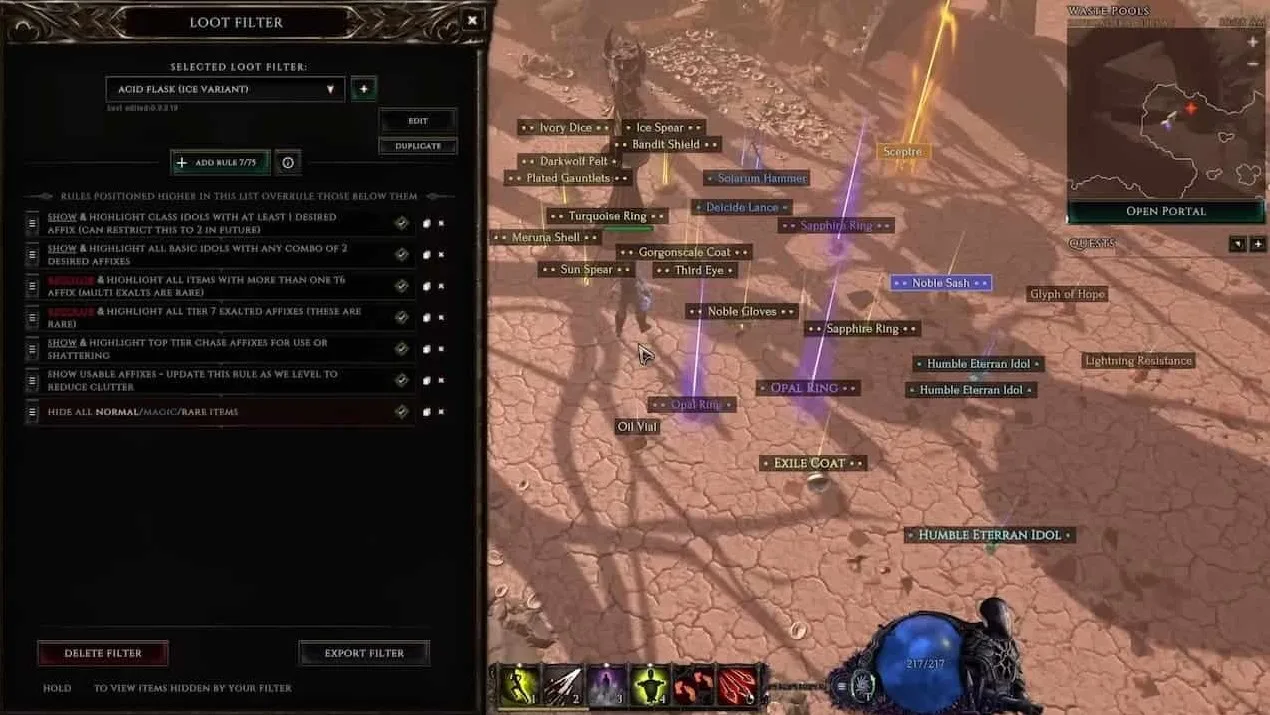
Create a filter without hiding important drops
Open the loot-filter interface with Shift + F. Select no filter, create a new filter, and give it a name that identifies the character or build. The icon, color, and description help organize multiple filters, but the rules determine what appears.
Build the first version in this order:
- Add protection rules for special drops. Create explicit show or recolor rules for the rarities and special item groups you always want to inspect. Keep these protections above broad hiding rules. Community filters commonly separate important Unique or Exalted drops into several visual levels, but their exact thresholds reflect that author's goals, not a universal standard.
- Highlight affixes you actively need. Add an affix condition and select the affixes required by your build or crafting plan. Useful candidates can include health-related affixes, attributes, class-specific skill affixes, idol affixes, and other properties named by the build you are following. Do not select an affix merely because another filter does.
- Separate crafting finds from wearable upgrades. Recolor items carrying affixes you want to collect. Then create narrower equipment rules that combine the correct item type or base with relevant affixes. This prevents a crafting item from looking identical to a likely upgrade.
- Restrict irrelevant equipment deliberately. Add class, item-type, or base-type conditions only when you are comfortable losing visibility of excluded drops. This matters if you collect gear for another class or keep items for an alt.
- Place broad hide rules last. A rule that hides a wide category is convenient but risky. Keep it below the rules that protect special drops, wanted affixes, and wanted bases. If you later add a new highlight, check where it sits relative to the hide rules.
- Name every rule by its decision. Names such as “show crafting affixes,” “recolor current helmet upgrades,” and “hide unwanted weapons” are easier to audit than names based only on colors.
- Disable uncertain rules instead of deleting them. A disabled rule preserves your work while you check whether it was responsible for an unwanted result.
The first matching rule controls an item’s display. A broad base-type hide above special-rarity protection can therefore conceal items you intended to inspect. Keep the priority clear: protect first, narrow second, hide last.
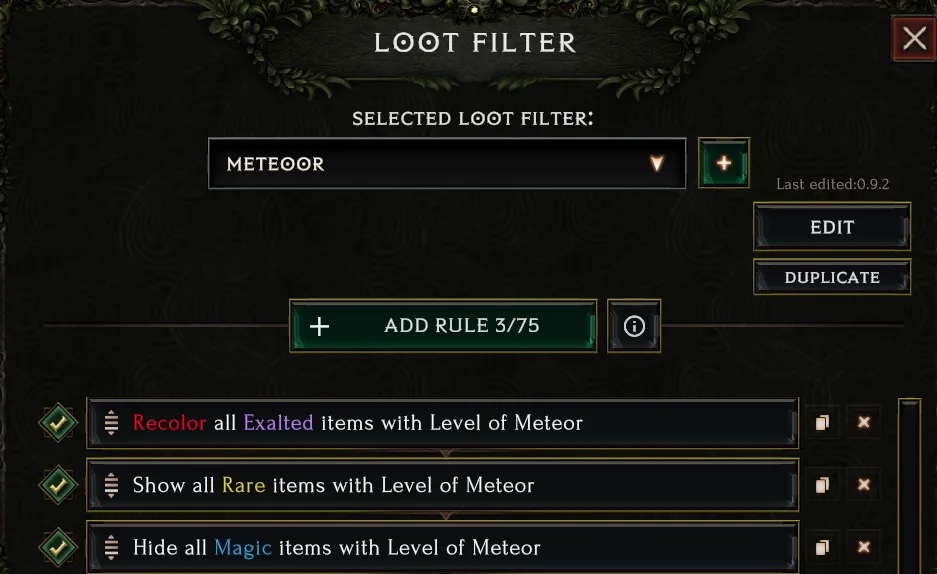
Import a shared Last Epoch loot filter safely
Importing is useful when a build guide already provides a filter, but an import should be a starting point rather than a sealed configuration. Shared-filter libraries include filters tagged by season or version, class, mastery, skill, leveling, beginner, and endgame use. Those labels help narrow the list, but they do not prove that every rule matches your character.
For Season 5, prefer a filter explicitly labeled Rage of the Frostborn or version 1.5. Do not assume an undated filter, an older guide attachment, or a filter built for a previous season is Season 5 compatible. A maintained older forum thread may contain newer files, so inspect the actual file version rather than relying on the thread's original date.
To import clipboard content:
- Copy the complete filter text supplied by the filter author or build guide.
- Open the loot-filter interface with Shift + F.
- Choose the import option and paste the clipboard contents.
- Save the imported filter under a name that includes its purpose and version.
- Inspect its top protection rules, bottom hide rules, class restrictions, selected affixes, and item bases before activating it.
- Duplicate it before major edits so you can return to the imported version if your changes hide too much.
If a build guide offers both leveling and endgame filters, choose the one matching your actual stage. An endgame filter can be far too strict for a character still replacing ordinary gear. Likewise, a broad leveling filter may remain noisy once you only care about a few bases and affixes.
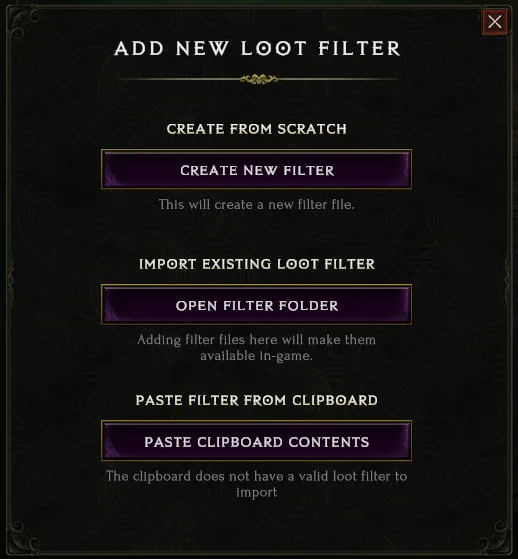
Read each rule as a visible decision
A filter is easier to maintain when you can explain every rule in one sentence. Read the action first, then its conditions.
| Rule element | What it should mean to you |
|---|---|
| Show | Keep matching drops visible without necessarily changing their appearance |
| Recolor or emphasize | Make a matching drop visually distinct because it needs a specific decision |
| Hide | Remove a category you have deliberately decided not to inspect |
| Rarity condition | Limit a rule to the selected rarity group |
| Affix condition | Match items carrying selected affixes, sometimes with additional advanced conditions |
| Item type or base condition | Limit the rule to equipment slots, weapon categories, or named bases |
| Class restriction | Focus the rule on one class, at the cost of hiding or ignoring other-class opportunities |
| Advanced threshold | Narrow the match by affix tier, total affix strength, Legendary Potential, Weaver's Will, or another available field |
Do not turn examples from public filters into universal thresholds. One player may want every item with a desired crafting affix. Another may only want that affix on a useful base. A Merchant's Guild character may care about items that a self-found character ignores, but this page does not prescribe market values. Your rule should state what you will do with the drop.
Colors also need consistent meanings. For example, one color can mean “collect this affix,” another “possible equipped upgrade,” and a stronger emphasis can mark “stop and inspect.” The exact palette is personal. The important part is that two different decisions do not look identical.
Fix the most common filter failures
When the filter behaves badly, change one rule at a time. Large rewrites make it difficult to identify the cause.
Almost nothing appears. Disable the broadest hide rule first. If drops return, that rule is either too high in the list or too broad. Re-enable it only after adding the protection and upgrade rules that must sit above it.
Too many ordinary items appear. Check whether your affix rule accepts every rarity or every base. Add the missing restriction that reflects your goal. If you only need crafting affixes, decide whether low-value item categories still deserve visibility rather than hiding them automatically.
A wanted item appears in the wrong color. Look for an earlier overlapping recolor rule. Two rules may both match the item, while the higher rule determines the visible treatment. Rename the rules by purpose and move the more specific decision above the general one.
A build upgrade never appears. Check class restrictions, item type, base selection, affix selection, and any advanced condition. Do not respond by assuming the item cannot drop. Temporarily disable the relevant hide rule and loosen one condition at a time.
Unique or Exalted items disappear. Verify that their protection rules are enabled and positioned above base, weapon, rarity, and class hiding rules. If an imported filter splits special items by potential, affix tier, or another field, make sure there is still a catch-all rule for the drops you want to inspect.
The filter works while leveling but becomes noisy later. Duplicate it and make an endgame copy. Narrow bases and affixes in the copy while preserving special-drop protections. This is safer than turning a readable leveling filter into a tangle of temporary rules.
An imported filter feels wrong immediately. Confirm its season or game version, class, mastery, skill, and progression tag. Then inspect what it hides. A filter can be well made and still be wrong for your build, faction priorities, alt plans, or current gear.
You cannot tell why an item is shown. Temporarily disable likely matching rules from the top downward until its treatment changes. The first relevant change identifies the controlling rule. Re-enable everything afterward and rename the rule so the reason is obvious next time.
Adjust strictness as your character progresses
Maintain separate copies for different stages instead of forcing one filter to cover every situation.
- Leveling copy: keep more rare items, useful class affixes, several plausible bases, and crafting affixes visible. Avoid aggressive weapon or base hiding until your build direction is stable.
- Transition copy: narrow equipment to the slots, bases, and affixes that can improve the current setup. Keep crafting targets and special-rarity protections clear.
- Endgame copy: show the specific bases, affix combinations, and special items that serve your current farm. Hide routine drops only after the desired exceptions are protected.
- Alt-aware copy: retain explicitly chosen off-class or generic affixes. Do not use a class-only filter if collecting for another character is part of your plan.
A copied filter is also useful when changing builds. Rename it, replace the build-specific affixes and bases, and review every hide rule. Do not merely add new rules on top of the old build's restrictions; the old conditions may still conceal your new targets.
Season 5 shared libraries contain filters labeled for version 1.5, including leveling and endgame options, but labels are only a screening tool. The correct filter is the one whose visible decisions match your character today.
Final safety check before normal play
Before relying on the filter, confirm all of the following:
- special drops you care about have enabled protection rules near the top;
- build-specific affixes and bases are selected intentionally;
- crafting finds and likely upgrades use different visual treatments;
- broad hide rules sit below the exceptions they must not override;
- class restrictions match whether you collect gear for alts;
- imported filters identify an appropriate season or version;
- leveling and endgame strictness are kept in separate copies when their goals differ;
- every rule name explains why you would inspect, collect, equip, or ignore the matching item.
If you cannot explain a rule, disable it until you can. A reliable Last Epoch loot filter is not the one with the most rules. It is the one that makes each visible drop easy to act on without silently removing the categories you still need.