
Cheat Engine can be used to prototype a Last Epoch character without committing hours to leveling and item farming, but the experiment should stay entirely offline. Last Epoch keeps online and offline characters separate, and they cannot be transferred between those modes. Do not attach Cheat Engine to an online session or expect an edited offline character to become an online character later.
The other important limitation is version compatibility. Last Epoch is currently on patch 1.5.2, while the closest documented Cheat Engine table is table version 2.7.3 for Last Epoch 1.5.1.2 and Cheat Engine 7.7. That table may fail, partially activate, or alter the wrong value after the game update. Treat every option as unconfirmed on 1.5.2 until you test it on a disposable offline save.
What is actually current on patch 1.5.2
A table being recent does not make it compatible with the current executable. Cheat Engine tables depend on game code and memory locations that can move when the game is patched. Even a small hotfix can break an activation script while leaving other entries apparently functional.
| Tool or file | Documented target | What you should assume on 1.5.2 |
|---|---|---|
| Cheat Engine table 2.7.3 | Last Epoch 1.5.1.2 on Windows with Cheat Engine 7.7 | Unverified; test individual entries offline rather than assuming the whole table works |
Older public .CT file | Uploaded in October 2024 | Outdated for current use unless its author has separately updated it |
| FLiNG trainer with 25 options | Labeled for versions 1.0 through 1.5 and marked offline only | A separate trainer, not proof that a Cheat Engine table works on 1.5.2 |
| WeMod trainer | Detects the installed game version and reports whether it considers that version supported | A separate tool whose version check does not validate another table |
The patch mismatch matters more than the number of advertised features. An entry can activate without producing the intended result, or it can appear to work until you change zones, open another interface, or reload the character. Never use a successful activation checkbox as the only compatibility test.
Keep the experiment offline
Last Epoch supports a complete offline mode alongside online play. Those character pools are separate: an offline character cannot be moved online, and an online character cannot be converted into an offline test character. Create a dedicated offline character for experiments instead of modifying the character that represents your normal progression.
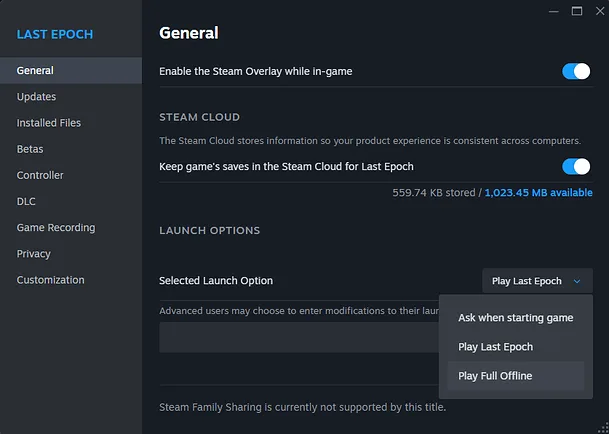
Select Full Offline before creating or loading the isolated test character.
Offline-only use creates a clean boundary for three reasons:
- It prevents edited progression, items, or resources from entering an online character.
- It lets you discard the test character without affecting the character you actually intend to play.
- It makes the purpose of the character obvious when you return after a break or update.
Offline mode is not a guarantee that a third-party executable is secure, compatible, or permitted under every applicable software term. A trainer claiming to be safe is still only making its own claim. Avoid repacked files, do not assume an antivirus warning is automatically harmless, and do not grant software broader access than it needs.
Prepare a disposable test before attaching Cheat Engine
Do not begin with the character or save you care about. The minimum preparation is a reversible test environment with one clear question to answer.
- Confirm that the game reports version 1.5.2.
- Create or select a disposable offline character.
- Exit the game and make a separate backup of the offline save before editing anything.
- Record the character's level, passive points, skill points, equipped items, and current zone.
- Decide on one test, such as whether a skill rotation feels good with more levels or whether a resource cost makes the build unpleasant.
- Keep the untouched backup until the entire experiment is finished and the game has been restarted successfully.
A backup is especially important when an option changes progression, item data, passive points, Weaver points, Monolith state, or crafting values. Turning an option off does not prove that every written value has returned to its original state.
A clean offline testing workflow
The documented table identifies the Windows process as Last Epoch.exe and declares Cheat Engine 7.7 as its intended Cheat Engine version. Those details describe the 1.5.1.2 table; they do not establish 1.5.2 compatibility.
Use the following sequence to limit the number of variables involved:
- Start the dedicated offline character and remain in a low-stakes area.
- Open Cheat Engine and attach it only to the local
Last Epoch.exeprocess belonging to that offline session. - Load the table and leave its feature groups collapsed at first.
- Activate one entry, not an entire category.
- Check both the visible value and the related behavior. A number changing in the interface is not enough if the underlying action behaves differently.
- Change zones once when the option is supposed to persist across zones. Stop if the game crashes, freezes, duplicates effects, or displays inconsistent values.
- Disable the entry before trying another feature.
- Close the game normally, restart it without the table, and inspect the character again.
- Restore the backup instead of trying to repair unexplained changes by adding more edits.
This sequence is slower than enabling every desired option at once, but it tells you which entry caused a failure. It also avoids confusing a patch-related table error with an interaction between several active scripts.
What the historical table options are designed to change
The 1.5.1.2 table advertised many categories. The list below explains their testing purpose without claiming that they work on 1.5.2.
| Option group | Examples in the historical table | Useful offline question | Main distortion risk |
|---|---|---|---|
| Character resources | Infinite mana, zero mana cost, passive points, skill points, and experience-related values | Does the skill rotation feel smooth when fully developed? | Removing resource pressure can hide a build's real weakness |
| Combat speed | Cast speed, movement speed, extra projectiles, cooldown removal, and automatic targeting | Is the basic playstyle enjoyable at a planned speed? | Extreme values change animation timing and can make the result meaningless |
| Items and crafting | Affix tiers, item rarity, forging cost, forging potential, Legendary Potential, Weaver's Will, shards, runes, and glyphs | Does a specific item interaction produce the playstyle you expected? | Perfect items do not represent a realistically obtainable character |
| Monolith testing | Stability, corruption pointers, Gaze of Orobyss data, objective reveal, and quest-echo bypass | Does the build still function in a representative endgame encounter? | Skipping progression removes the context needed to judge survivability and gearing |
| Drops and encounters | Drop modifiers, monster density, encounter forcing, prophecy rewards, and echo spawning | Can you reproduce a narrow interaction without waiting for random conditions? | Extra enemies or rewards can cause instability and do not model ordinary play |
| Convenience | Map reveal, pickup range, material vacuum, waypoints, and Eternity Cache reuse | Can you reduce setup time between repeated offline tests? | Persistent progression changes may remain after the immediate test ends |
Do not treat this menu as a checklist. Most build tests need only a level or point adjustment, a controlled equipment setup, and a normal combat trial. God mode, one-hit kills, perfect rolls, unlimited resources, accelerated game speed, and extreme density all at once produce a spectacle rather than useful build information.
Test one hypothesis instead of creating a perfect character
The most useful reason to use Cheat Engine here is to answer a focused question before investing in a real character. Examples include whether you enjoy a mastery at endgame, whether a particular skill combination feels awkward, or whether an item-dependent interaction is worth pursuing.
Run the comparison in stages:
- Build a baseline with the intended skills and ordinary resource limits.
- Fight the same type of content long enough to observe movement, targeting, mana use, cooldown gaps, and defensive failures.
- Change only the variable you came to test, such as one item, a small group of passive points, or a target skill level.
- Repeat the same combat pattern.
- Write down what changed in play rather than judging only the damage number.
- Remove the edit and confirm that the behavior returns to the baseline.
A useful result might be that the rotation is enjoyable but mana recovery is the actual bottleneck. An unhelpful result is that everything dies instantly while you are invulnerable, because that says almost nothing about the build you would eventually play.
Keep acquisition and performance separate. A test character can show how a finished interaction behaves, but it cannot show how pleasant the leveling route is, how often the necessary items drop, or whether the intermediate version survives normal progression. Perfect affixes and maximum Legendary Potential can also exaggerate a concept that is much weaker with realistic equipment.
Stop when the table behaves unpredictably
Patch incompatibility often appears as partial failure rather than a clean error. Stop the test and return to the backup when you see any of these signs:
- An entry refuses to activate or immediately disables itself.
- The displayed value changes while the related action does not.
- A value jumps to an unexpected amount or affects a different system.
- The game freezes or crashes during a zone transition.
- Items become duplicated references, change rarity unexpectedly, or display impossible combinations.
- Passive, skill, faction, Monolith, or crafting values remain altered after the option is disabled.
- Stacking buffs, projectiles, drops, or enemies continue increasing beyond the intended test.
Do not respond by activating more entries, trying random pointer values, or forcing an old script to run. That makes the save harder to diagnose and increases the chance that a seemingly unrelated value is written. Wait for a table explicitly updated for 1.5.2, or conduct the test with ordinary offline progression.
Decide whether Cheat Engine is the right tool
Use a Cheat Engine table only when you need to observe actual offline gameplay and are willing to discard the save. Use a build planner when you only need to compare skills, passives, or hypothetical equipment on paper. Use normal offline play when the leveling journey, resource progression, and item acquisition are part of what you want to evaluate.
The practical rule is simple: keep Cheat Engine attached only to a disposable offline session, verify one option at a time, and assume the 1.5.1.2 table is incompatible with 1.5.2 until its behavior proves otherwise. If the experiment stops being reversible, stop the experiment rather than risking the character you want to keep.