
A useful Last Epoch Season 5 loot filter is one you have configured for your character's current equipment goals. Start with an explicitly Season 5 filter, choose the relevant classes, weapons, affixes, and idols, then check its level-based cutoffs before trusting it in Monoliths. An updated title alone does not make every default rule suitable for your build.
Raxx's S5 Universal Filter provides a broad configurable starting point, while build-specific filters can focus on a particular setup such as Mana Flay Lich. Choose the universal route if you want to prepare several characters; choose a build filter when its damage route and progression stage match yours. Keep essential resources and desired unique items visible while testing stricter equipment rules.
Choose a filter by ownership and progression
A universal filter usually needs more configuration because it must accommodate equipment it cannot know you want. A build-specific filter starts with narrower assumptions, but those assumptions can become wrong when you change skills, damage conversion, class plans, or farming goals.
| Starting point | Useful when | Essential check |
|---|---|---|
| S5 universal filter | You want a configurable filter for one or several characters | Fill in classes, affixes, weapon types, and desired uniques |
| Matching S5 build filter | You are following the same build and leveling route | Confirm skill variant, level stage, and hidden classes |
| Existing personal filter | You understand its rules and want to preserve your setup | Audit new items and changed assumptions before increasing strictness |
| Older filter | You only need a starting rule structure | Treat it as incomplete until current item and stage checks are finished |
Do not choose strictness solely from character level. A level milestone can disable broad safety rules even while your equipment still needs ordinary upgrades. A fresh character entering Monoliths and an established character farming for final donors have different needs even if their levels are similar.
Raxx's S5 template includes instructional rule names. Read those instructions as configuration prompts: entries asking for best weapon bases, desired affixes, or classes are not complete until you select the relevant conditions. A blank or overly broad field can change what you see much more than the color assigned to that rule.
For an alt plan, add equipment goals deliberately. Keeping all classes visible forever produces noise, but hiding every other class immediately can prevent you from preparing the next character. Choose the classes you actually intend to play and give their important items explicit protection.
Audit level cutoffs before leaving the campaign
The S5 universal template contains several automatically ending rules. Its broad campaign rules turn off at level 60, its all-unique rule at 80, and its broad all-exalted safety rule at 60. T6 armor rules can stop at 85, while some idol rules stop at 75 or 90. These are template choices rather than universal points at which those items lose value.
| Template rule or group | Listed cutoff | Review before it ends |
|---|---|---|
| Broad campaign rules | 60 | Are your basic equipment slots still unfinished |
| All exalted safety rule | 60 | Are desired T6 and donor affixes explicitly selected |
| All unique safety rule | 80 | Are build-specific and rare desired uniques protected |
| T6 armor rule | 85 | Would T6 gear still improve a current slot |
| Decent idol rule | 75 | Do you already have usable idols |
| Godly idol rule | 90 | Have you configured the narrower final idol rules |
Do this review before the level transition rather than after a suspiciously quiet map. If your defenses are still weak, preserve a suitable equipment rule longer. If you are collecting donors for a new unique, ensure the donor rules remain broad enough for its equipment type before the all-exalted rule stops covering gaps.
An older tutorial may show different cutoff numbers. The exported S5 filter you actually imported is the object you must inspect. Use its current rule conditions instead of assuming every filter bearing the same creator's name has retained identical defaults across seasons.
Protect unique items before tightening LP rules
The universal template separates high-LP and Weaver's Will items from rare zero-LP uniques and selected Set items. It also explicitly protects Legendary items. Preserve the items that enable your build before hiding less desirable duplicates or low-potential drops.
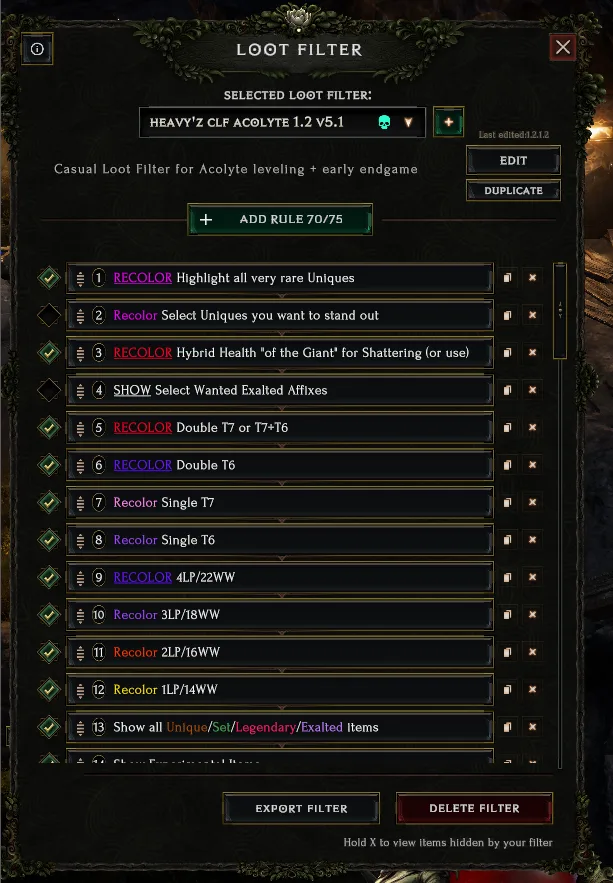
Example rule list from an older filter; rebuild Season 5 affix and variant conditions.
A required unique can be useful at zero LP. A rule that only shows one-LP or better versions can hide the first usable copy. Conversely, retaining every common unique indefinitely may make later farming unnecessarily noisy. The correct change is a specific protection list for items you still want, followed by tighter handling of irrelevant duplicates.
Review the new Season 5 uniques in the filter's item selector. Do not assume an old name list automatically includes every item introduced this season. Named build enablers, unusual variant-affix items, and chase items deserve explicit checks if they are relevant to your plans.
Unsated Rage uses a variant affix drawn from its own pool. Season 5 adds a Variant affix category to the selector, so examine that category when you want to distinguish desired variants. Keep the ring visible broadly until you understand the chosen conditions; a narrow generic affix rule is not a substitute for checking its unique behavior.
LP thresholds and Weaver's Will thresholds describe different properties. Do not read a template entry covering both as though every unique can roll both. Confirm the item and its relevant property before making a rarity rule more restrictive.
Separate equipment to wear from Legendary donors
For an item you intend to equip directly, base type and subtype can matter. For an exalted donor you plan to use in Legendary crafting, the transferable affixes are often the main target. Adding an unnecessary exact subtype restriction can hide donors whose useful affix would transfer just as well.
The S5 universal template distinguishes best-in-slot equipment rules from T6, T7, double-exalted, and Havoc-oriented rules. Configure each for its purpose. If you use different weapons with different affix goals, duplicate or separate the relevant weapon rules rather than combining unrelated requirements into one filter condition.
A T7 item with an unwanted high-tier affix may still be a candidate for a Rune of Havoc plan if another affix on it is useful. That does not guarantee Havoc will produce the desired donor; it means the item deserves assessment before a simple unwanted-affix rule hides it.
Do not assign the same strict base rule to both worn gear and donors. A precise direct upgrade can deserve a distinctive color, while a broader donor rule keeps potentially useful affixes visible. That separation preserves crafting options without making every purple item look equally important.
Keep double-exalted items and specialized affix types under deliberate rules. Experimental and Champion affixes may be irrelevant to one character and central to another. Disable a category only after deciding that you do not want its equipment or future crafting possibilities.
Match idol strictness to the idols you have
Idol filters can require both desired affixes, which makes the result more selective. In the universal template, several best-idol rules are built around that stricter approach. If you are still filling the grid, relax the relevant condition to one useful affix rather than waiting indefinitely for a perfect combination.
Select the idol sizes and class-specific affixes your character can actually use. Generic small idols and larger class-specific idols serve different needs, so a rule that works for one group may not cover the other. Do not remove all intermediate idols merely because your eventual setup uses a narrower size.
Idol Altars need their own subtype and affix review. Season 5 also limits early altar affixes: before 150 corruption they drop with fewer affixes, and below level 50 they have none. A strict filter designed around a late farming altar should not be used to infer that earlier encounters are failing to drop a valid reward.
When preparing another character, protect its required idols separately from your main character's final combinations. This is particularly useful when a universal filter is meant to collect gear for several classes. The goal is understandable categories, not a single color that hides the reason an idol was retained.
Preserve resources and practical crafting targets
The universal template includes resource rules for Glyphs, Keys and Resources, Resonances, Runes, Shards, and Woven Echoes. Keep these visible unless you have a specific reason to change them. Tightening armor and weapon rules should not accidentally become a decision to discard the materials needed for progression and crafting.
Shard-collection rules should reflect what you lack. Early in progression, an item with an otherwise unimpressive affix can be useful for shattering. Once you have enough of that shard, reduce the collection rule rather than letting every low-tier piece remain permanently highlighted.
Faction-related rules also need inspection. A template rule intended to retain Circle of Fortune items for Rune of Ascendance can include a CoF requirement. If you are using Merchant's Guild, check that condition before expecting the same rule to identify ordinary items for your own crafting plan.
Season 5 changes some early corrupted-item expectations. Precorrupted items below area level 80 cannot roll T7 affixes, and below area level 50 cannot roll T6. This is separate from Rune of Corruption's item-level restrictions. A quiet high-tier-corrupted rule in an early zone may reflect item eligibility rather than a broken filter.
Check the filter with representative items
Before a long farming session, use items whose properties you already know to check the rules. In a safe place, drop representative equipment, inspect what remains visible, and compare each result with the purpose of the filter. This is a practical verification step, not proof that every possible item combination has been covered.
Use a small set that exercises different goals:
- A required zero-LP unique that must remain visible.
- A compatible exalted donor with a desired T6 or T7 affix.
- A direct upgrade on a chosen base.
- A useful idol that has only one of the final desired affixes.
- A class-specific item for an alt you intend to prepare.
- An irrelevant item that your stricter equipment rules should hide.
If an unwanted item is shown, inspect the rule responsible before deleting broad protections. It may match a selected affix you no longer need. If a wanted item is hidden, check class restrictions, item types, affix counts, subtype requirements, and level conditions before making the entire filter less strict.
Change one condition at a time and repeat the relevant check. Colors explain priority only within the filter you configured; purple, red, orange, or green are not universal instructions to equip, shatter, or craft an item. Read the item before performing a destructive crafting action.
Revisit the filter when you change your build, obtain a required unique, finish a defensive slot, or begin collecting a different donor. Those events change what constitutes a useful drop. A filter that follows your current goals stays understandable, while a permanently unchanged strict preset can quietly stop showing the equipment you actually need next.